How to Implement an AI Chatbot in Your Patient Portal: A HIPAA-Compliant Development Guide

Slava Khristich



Vlad Nazarov
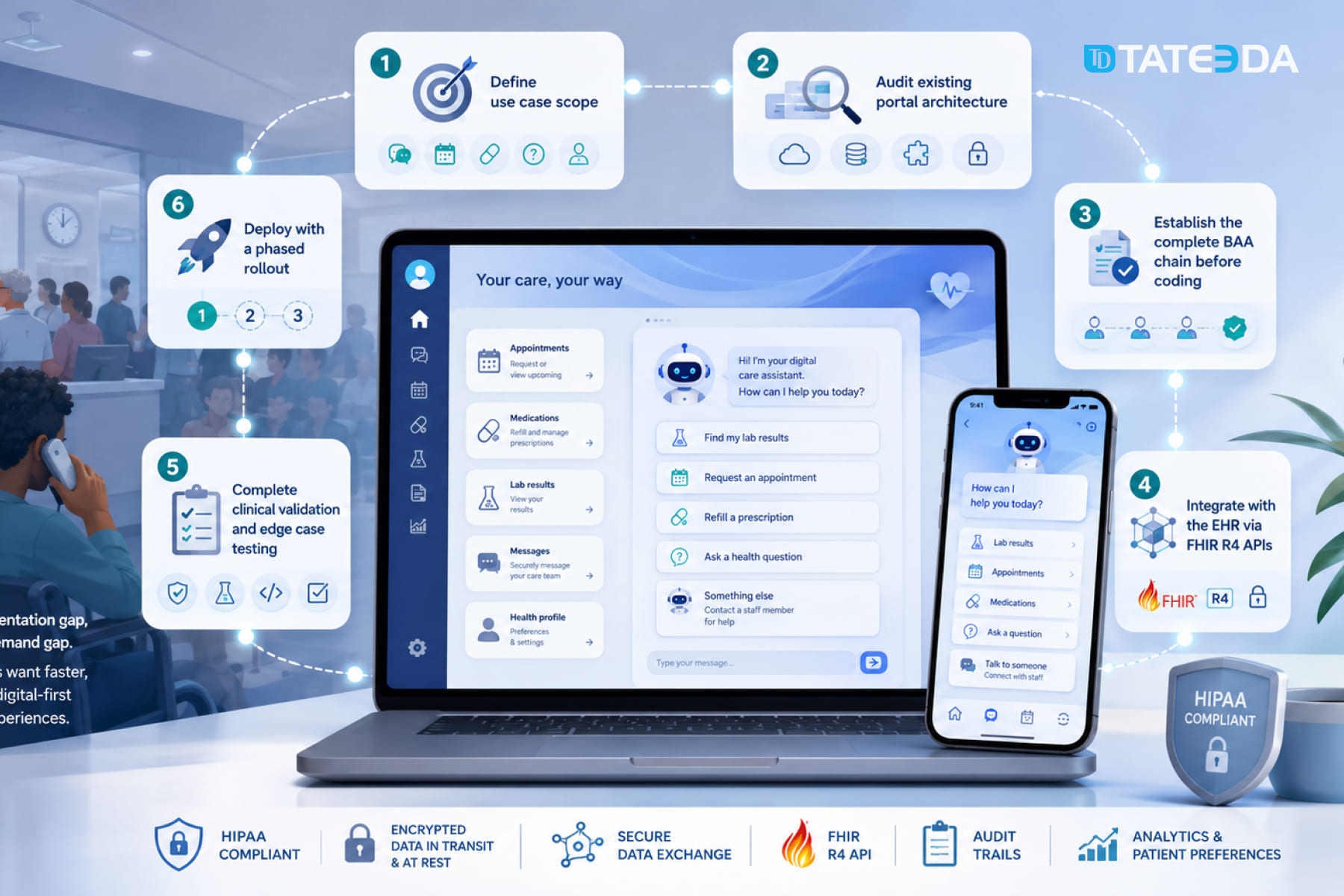
In this article, we explain how healthcare organizations can implement an AI chatbot inside a patient portal without creating HIPAA, EHR integration, or patient safety gaps. The guide walks through use-case selection, BAA chains, FHIR R4 integration, PHI-safe LLM pipelines, clinical validation, platform-vs-custom decisions, and phased rollout planning.
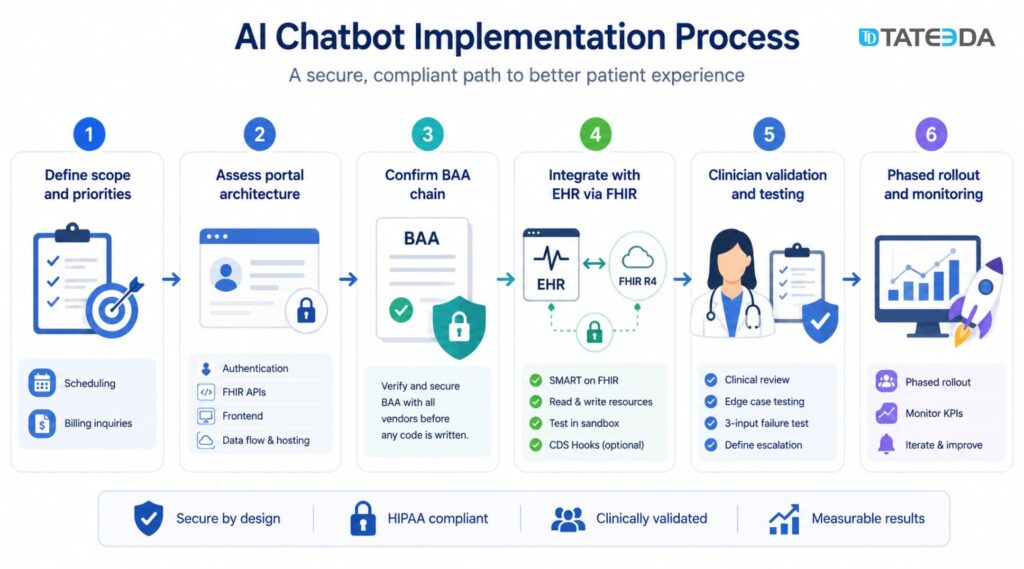
Implementing an AI chatbot in a patient portal requires six core steps: defining use case scope, auditing your existing portal architecture, establishing a complete Business Associate Agreement (BAA) chain before writing any code, integrating with your Electronic Health Record (EHR) via Fast Healthcare Interoperability Resources (FHIR) R4, completing clinical validation and edge case testing, and deploying with a phased rollout.
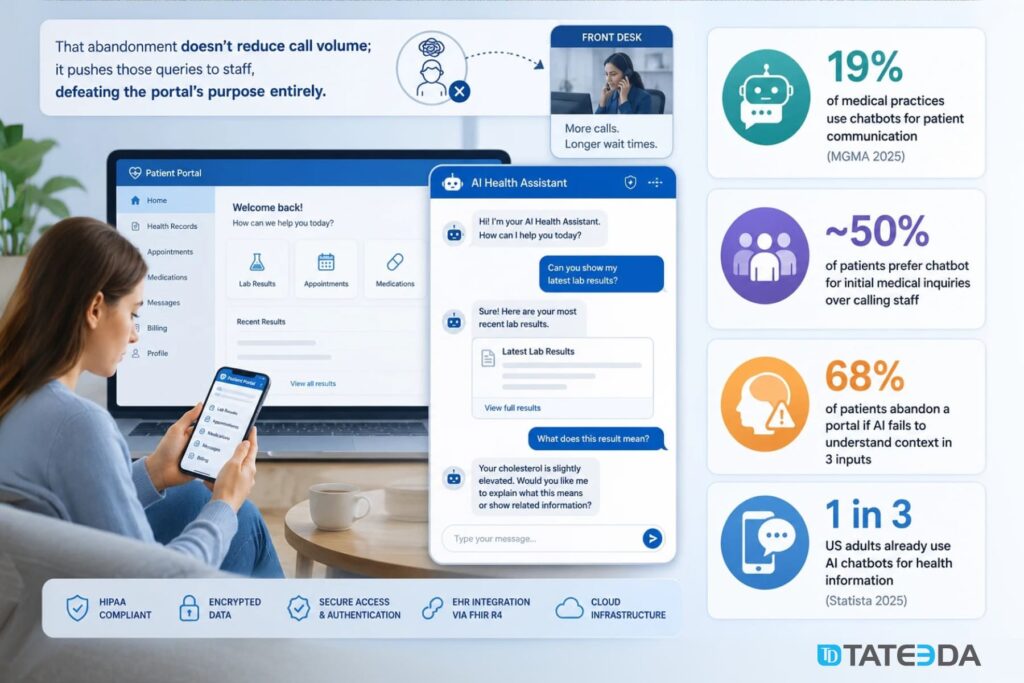
Only 19% of medical practices currently use chatbots for patient communication, according to MGMA’s 2025 data, yet nearly 50% of patients say they prefer a chatbot for initial medical inquiries over waiting for staff. That’s not a technology gap; it’s an implementation gap. Teams that hesitate aren’t unconvinced about the value. They’re unsure how to build it correctly under the Health Insurance Portability and Accountability Act (HIPAA) requirements.
| When a patient portal becomes a login-protected maze… James, an engineering director at a regional clinic group in the Midwest, spent two years and over $400,000 building a patient portal. It gave patients access to lab results, appointment history, and prescription refills. When it launched, patients still called the front desk at the same rate as before. James ran a survey. Most patients had visited the portal, couldn’t find what they needed within a few clicks, and gave up. The portal had no conversational layer. It was a database viewer with a login screen, not an engagement tool. The fix wasn’t rebuilding the portal. It was adding a conversational AI layer that could answer questions, route requests, and hand off to staff when needed. |
You’ll find a specific implementation framework, HIPAA architecture requirements, FHIR integration specifics, and a clear decision framework for choosing between SaaS platforms and custom development in this guide.

Looking for a partner who has built this before?
TATEEDA’s custom patient portal development team builds HIPAA-compliant portals with AI chatbot integration for US health systems.
| Key Takeaways: ✅ A functional AI chatbot patient portal requires a complete BAA chain covering every vendor that touches protected health information (PHI): the chatbot platform, the LLM API, cloud provider, analytics tools, and EHR middleware all require separate BAAs. ✅ FHIR R4 is the integration standard for chatbot-to-EHR data exchange; CDS Hooks triggers chatbot-driven actions within EHR clinical workflows. ✅ The January 2025 HIPAA Security Rule update removes the required vs. addressable specification distinction; all security safeguards are now mandatory, directly changing chatbot architecture requirements. ✅ 68% of patients abandon a patient portal when AI assistance fails to understand their intent within three inputs; UX failure is a clinical and operational risk. ✅ Custom development is the right choice when EHR integration requires proprietary FHIR extensions, the use case involves clinical triage or prescription management, or the portal architecture doesn’t support standard SaaS chatbot connectors. |
Table of Contents
Why Patient Portals Need AI Chatbots Now
The engagement gap in today’s patient portals
Most patient portals were designed around one idea: give patients secure access to their records. Appointments, lab results, and medication lists, all accessible online. That was a meaningful improvement in the 2010s. It’s no longer sufficient.
Patients interact with consumer apps that answer questions in seconds. They bank with chatbots, file support tickets through AI assistants, and use conversational interfaces for travel, shopping, and prescription delivery. When they log into a patient portal and find a static information display with a “contact your provider” button, they don’t engage. They call the front desk.
The engagement gap is measurable. When patients can’t accomplish a task in a patient portal within two or three interactions, most leave. According to Appinventiv’s research, 68% of patients abandon a portal when AI assistance fails to understand context within three inputs. That abandonment doesn’t reduce call volume; it pushes those queries to staff, defeating the portal’s purpose entirely.
What patients actually want from a portal chatbot
The use cases patients actually want are narrower than chatbot vendors typically claim:
- Scheduling: “Is Dr. Johnson available Thursday morning?” outperforms navigating a calendar tool.
- Triage routing: “I’ve had a headache for three days, should I come in or call?” requires a routing answer, not a disclaimer.
- Billing questions: “Why does my balance show $340?” is a task a chatbot can resolve without staff involvement.
- Prescription refills: Confirming prior authorizations and routing refill requests is high-volume, low-complexity work.
- Pre-visit preparation: Automated intake forms and “what should I bring?” answers reduce arrival-day front-desk time.
The market shift: from passive record access to AI-assisted engagement
The healthcare chatbot market was valued at $1.98 billion in 2025 and is projected to reach $12.63 billion by 2034, a 23.01% compound annual growth rate (Fortune Business Insights). That growth is driven primarily by AI patient engagement platforms, including patient portal AI assistants.
Epic began piloting AI chatbot functionality within its MyChart portal for post-surgery check-ups in 2024. When the largest EHR vendor in the US market ships a patient portal chatbot, the capability becomes a baseline expectation, not a differentiator. Health systems that don’t build this will face patient experience comparisons against organizations that have.
Six High-Value Use Cases for an AI Chatbot Patient Portal
Not all healthcare chatbot implementation use cases carry the same risk. Some are straightforward to build and low-risk from a regulatory standpoint; others touch clinical decision-making and require careful architecture. Here’s how to evaluate each.
1. Appointment scheduling and reminders
Scheduling is the safest first use case. The chatbot queries available appointment slots via FHIR R4 Slot and Appointment resources, presents options, confirms the booking, and writes the confirmed appointment back to the EHR. PHI exposure is limited to name, patient ID, and appointment type.
Integration points are well-documented, and the FHIR API surface is stable across Epic, Oracle Health, and athenahealth environments. This use case also creates the fastest measurable ROI: automated scheduling reduces front-desk call volume, which is directly trackable.
2. Symptom triage and care routing
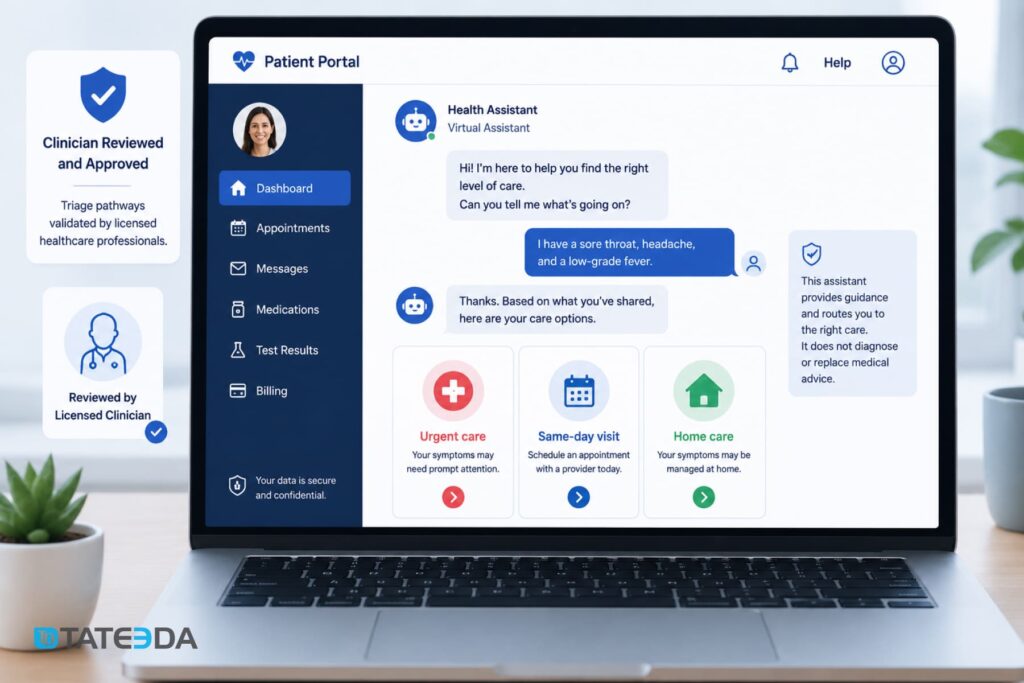
This is the highest-value and highest-risk use case. A chatbot that helps patients determine whether they need urgent care, a same-day appointment, or home management for mild symptoms can meaningfully improve care access. It can also create liability exposure if the routing logic is wrong.
The architecture requirement is clinical validation before deployment, not after. Every triage pathway must be reviewed by a licensed clinician. The chatbot should never represent itself as providing medical advice; it routes, it doesn’t diagnose. This distinction must be explicit in both the UX and the underlying decision logic.
3. Post-visit follow-up and medication adherence reminders
After discharge or office visits, the chatbot sends automated check-ins: “How are you feeling since your procedure on May 10?” or “Did you fill your metformin prescription?” These interactions feed back into the EHR via FHIR Observation or Communication resources, creating a documented patient touchpoint. This use case is particularly valuable for chronic disease management — diabetes, hypertension, heart failure — where adherence tracking reduces readmissions and improves quality metrics that affect reimbursement.
4. Benefits verification and prior authorization status
“Is this medication covered under my plan?” and “Where is my prior authorization for the MRI?” are questions patients ask repeatedly. Each call to verify this manually takes four to six minutes of staff time. Integrating the chatbot with a payer API layer or a clearinghouse like Waystar allows real-time benefits queries that patients can run themselves, with no staff involvement.
5. Pre-visit intake and patient questionnaires
Automated intake through the portal chatbot collects symptom history, medication updates, and insurance changes before the appointment. The data writes directly to the EHR via FHIR QuestionnaireResponse resources, eliminating the paper-to-digital transcription step and giving providers pre-populated clinical summaries on arrival day.
6. Billing inquiries and payment support
Billing questions are among the most common patient portal tasks and among the most manual to handle. “Why is my balance $340?” requires staff to pull the explanation of benefits, cross-reference insurance payments, and explain the math. A chatbot with access to billing data and payment plan APIs can answer this autonomously and initiate payment, with PHI handled appropriately under both HIPAA and Payment Card Industry Data Security Standard (PCI-DSS) requirements.
Ready to map your AI patient engagement use case to a HIPAA architecture?
Talk to TATEEDA’s patient portal engineers — we’ll scope the integration before you write a line of code.
HIPAA-Compliant Architecture for Your AI Chatbot Patient Portal
This is where most healthcare chatbot implementation projects fail — not at the feature level, but at the architecture level. Building a HIPAA-compliant chatbot requires evaluating every vendor in the AI stack before any code is written. The compliance requirements are more complex than a standard portal integration because they involve a third-party AI layer that most healthcare IT teams haven’t evaluated before.
Building the BAA chain: every vendor that touches PHI
A Business Associate Agreement is required from every vendor whose system processes, stores, or transmits PHI on behalf of a covered entity. For a patient portal chatbot, the BAA chain extends further than most teams expect:
- The chatbot platform(if using SaaS): Vendors like Nuance, Orbita, or Hyro need individual BAAs.
- The LLM API: If you’re calling OpenAI, Anthropic, Google Gemini, or any LLM endpoint, that vendor needs a BAA. OpenAI offers a Healthcare API tier with a BAA. Anthropic offers enterprise agreements that include data processing addenda. Verify this before architectural decisions lock you in.
- The cloud providers: AWS, Azure, and Google Cloud all offer BAA-covered HIPAA-eligible services, but specific services must be designated as HIPAA-eligible in the BAA. Not all services within those platforms qualify.
- The analytics and logging layer: If chatbot conversation logs flow through a third-party analytics tool, that tool needs a BAA if those logs contain PHI.
- The EHR middleware: If you’re using an integration platform (Mulesoft, Azure Health Data Services, AWS HealthLake) between the chatbot and the EHR, that vendor needs a BAA.
Getting a BAA from “the cloud provider” is not the same as establishing a complete BAA chain. Teams that skip this step often discover that the LLM API at the core of their system has no BAA in place. The result is a rewrite, a delayed launch, and a compliance risk exposure period that requires legal review. A peer-reviewed analysis of AI chatbots and HIPAA compliance published in PubMed Central documents this failure pattern across multiple healthcare AI implementations.
FHIR R4 integration: reading from and writing to the EHR
The chatbot’s ability to answer patient questions accurately depends on live data from the EHR, not a nightly sync. That means a live FHIR R4 API integration. For a patient portal AI chatbot, the critical FHIR resources include:
| FHIR Resource | Chatbot Use |
|---|---|
| Patient | Identity verification and demographics |
| Appointment, Slot | Scheduling read and write operations |
| MedicationRequest, MedicationStatement | Prescription context and refill routing |
| Observation | Lab results and vital signs (read only) |
| Condition | Active diagnoses for triage routing context |
| AllergyIntolerance | Safety checks for medication workflows |
| Communication | Logging chatbot interactions as patient record events |
| QuestionnaireResponse | Storing intake data from pre-visit workflows |
Authentication uses OAuth 2.0 with SMART on FHIR authorization scopes. A production FHIR chatbot integration uses the launch/patient context to scope access to the authenticated patient’s records only.
CDS Hooks is the mechanism for triggering chatbot-driven actions within EHR clinical workflows. When a provider opens a patient record, a CDS Hook can surface chatbot data from the patient’s recent portal interactions — a pre-visit intake summary or a post-discharge symptom report — directly into the clinical view.
TATEEDA’s EHR integration services cover FHIR R4 API development, SMART on FHIR authentication, and CDS Hooks integration across Epic, Oracle Health, and athenahealth environments.
PHI in LLM pipelines: zero-retention API configurations
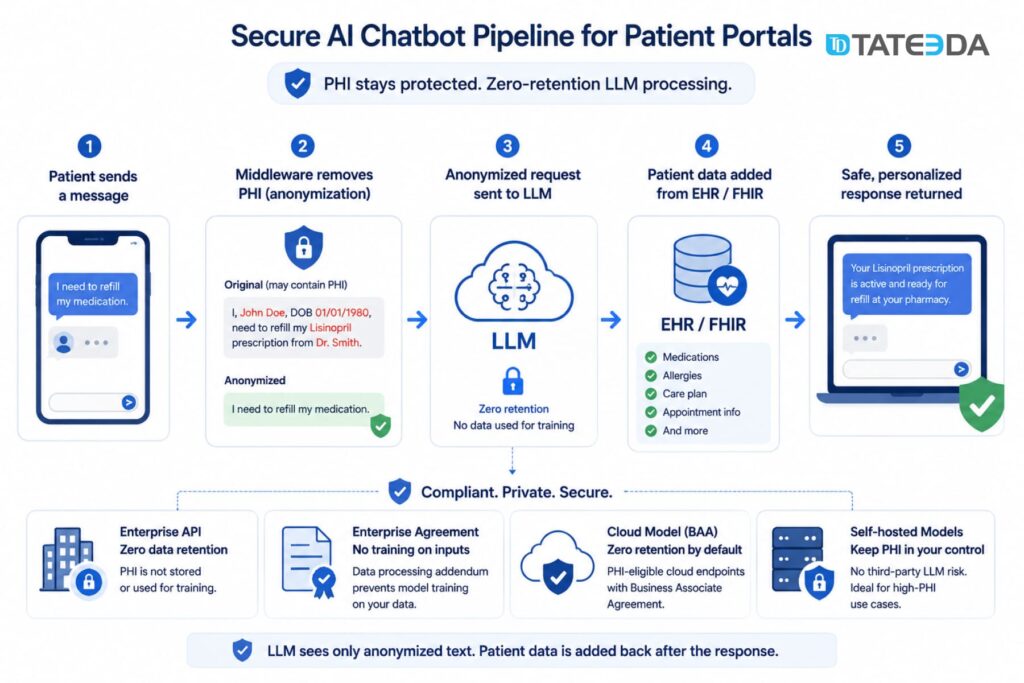
If your chatbot sends patient queries to an LLM API for natural language processing, you need to confirm that the LLM provider does not use that data for model training. Default API configurations for most commercial LLM providers do use API inputs for improvement purposes.
For HIPAA compliance, zero-retention API configurations are required:
- OpenAI API with zero data retention: Available on enterprise tier; PHI is not stored or used for training.
- Anthropic Claude API with enterprise agreement: Includes a data processing addendum with no training on inputs.
- Azure OpenAI Service: PHI-eligible under the Azure BAA; zero retention by default on Azure’s managed model endpoints.
- Self-hosted models: Eliminates third-party LLM risk entirely; appropriate for high-PHI use cases.
In practice, most patient portal chatbot queries don’t need to send PHI to the LLM at all. A well-architected system anonymizes the query at the middleware layer, sends the anonymized intent to the LLM for classification and response generation, then merges the response with patient-specific data from FHIR resources before returning the answer. This reduces LLM PHI exposure to near zero.
Audit logging, session data, and encryption requirements
HIPAA Security Rule requirements for chatbot sessions include:
- Audit logs: Every PHI access event must be logged with timestamp, user ID, data element accessed, and action taken. Logs must be retained for a minimum of six years.
- Session data: Chatbot session tokens must expire on browser close. Session data should not persist in client-side storage.
- Encryption: PHI in transit requires TLS 1.2 or higher; PHI at rest requires AES-256 encryption. This applies to chatbot conversation logs if stored.
- Authentication: The chatbot should inherit the portal’s multi-factor authentication (MFA) layer; patients must be authenticated before accessing the chatbot.
What changed in the 2025 HIPAA Security Rule update
In January 2025, the Department of Health and Human Services (HHS) proposed updates to the HIPAA Security Rule that directly affect chatbot implementations. The most significant change: the update removes the distinction between “required” and “addressable” implementation specifications. Under the current rule, addressable specifications could be documented as not applicable. Under the 2025 proposal, all specifications are mandatory.
For patient portal chatbots, previously addressable specifications that become required include:
- Automatic logoff for inactive sessions
- Encryption of PHI in transit and at rest
- Audit controls covering all PHI access events
- Device and media controls for systems that process PHI
Teams building or upgrading patient portal chatbots should design to the 2025 proposed standards, not the pre-2025 addressable framework. The public comment period closed in March 2025, and enforcement guidance is expected by late 2025.
Step-by-Step Implementation Process
Step 1: Define scope and use case priority
Start with two or three use cases that have high volume and low clinical risk. Scheduling and billing inquiries are the standard starting point — measurable, bounded, and they don’t touch clinical decision-making.
Document what the chatbot will and will not do. The scope document becomes the boundary for clinical validation in Step 5 and for BAA negotiations in Step 3.
Step 2: Assess existing patient portal architecture
Before selecting a chatbot platform or designing the integration approach, audit what you have:
- Authentication layer: What identity provider does the portal use? The chatbot must inherit the session context.
- FHIR API availability: Is your EHR already exposing FHIR R4 endpoints? Epic’s FHIR APIs are broadly available. Older Oracle Health or athenahealth environments may require updated API configurations before chatbot integration is possible.
- Frontend framework: The chatbot widget must integrate into your existing portal frontend — React.js, Angular, or a legacy framework. This determines whether a SaaS SDK is viable or whether custom widget development is required.
- Data flow and hosting: Where is patient data processed and stored? Knowing this determines which cloud regions are in scope for the HIPAA BAA.
Step 3: Establish the BAA chain before any code is written
Map every vendor that will touch PHI in the chatbot architecture — chatbot platform, LLM API, cloud provider, analytics, EHR middleware — and confirm BAA status before the first integration sprint. Get the agreements in writing, not a verbal confirmation from a sales representative.
This step is the most commonly skipped and the most consequential to compliance posture.
Step 4: Integrate with EHR via FHIR R4
Build the FHIR integration layer before building the chatbot UI. The integration should support both read and write operations for the FHIR resources in your use case scope, authenticated via SMART on FHIR.
Test the FHIR integration against your EHR’s sandbox environment before connecting to production. Epic, Oracle Health, and athenahealth all provide developer sandboxes. FHIR resource schemas vary across EHR implementations; a MedicationRequest resource in Epic may have different extension fields than the same resource in athenahealth. Confirming those differences in the sandbox prevents production integration failures.
For patient scheduling, implement CDS Hooks to surface chatbot interaction summaries in the EHR clinical workflow. This closes the loop between the patient-facing chatbot and the provider’s clinical record.
Step 5: Clinical validation and edge case testing
Every chatbot response pathway that touches clinical content requires validation by a licensed clinician before production deployment. This applies to triage routing, medication information, and any response that a patient might use to make a health decision.
Build a dedicated test suite for:
- Symptom inputs that approach emergency thresholds (“chest pain”, “difficulty breathing”) — the chatbot must route these to emergency services immediately, not attempt triage.
- Ambiguous inputs that the natural language processing layer may misclassify.
- Language and health literacy variations — patients don’t use clinical terminology.
- Multi-turn conversation failures — what happens when the chatbot can’t understand the user after two attempts?
The ONC’s patient access API guidance reinforces the 68% abandonment statistic: patients who fail to get a useful response within three inputs are a clinical and operational risk. Test the three-input failure scenario explicitly and define the escalation path.
Step 6: Go-live with phased rollout and adoption monitoring
Don’t deploy to all patients on day one. Phased rollout reduces risk and generates adoption data before full exposure:
- Phase 1: Staff-facing internal testing (2–4 weeks)
- Phase 2: Opt-in beta with a subset of active portal users (4–8 weeks)
- Phase 3: Full portal rollout with monitoring dashboards active
Key metrics: chatbot resolution rate (the percentage of sessions that don’t escalate to staff), abandonment rate by use case, average session length, and FHIR API error rate by resource type.
Set an escalation threshold for each use case. A scheduling resolution rate below 60% means the NLP training data needs improvement before the use case is production-ready.
Platform vs. Custom Development
When a chatbot SaaS platform is sufficient
Healthcare-focused SaaS chatbot platforms — Orbita, Hyro, Nuance products adjacent to Dragon Ambient eXperience — are the right choice when:
- Your use cases are limited to scheduling, FAQs, and basic triage routing.
- Your EHR is a tier-one system (Epic, Oracle Health, athenahealth) with pre-built connectors available.
- Your portal frontend uses a standard framework that the platform’s SDK supports.
- The chatbot’s primary function is to deflect front-desk call volume, not replace a clinical workflow.
SaaS chatbot platforms typically run $30,000–$80,000 per year in licensing plus $20,000–$60,000 in implementation fees, depending on the number of EHR integrations and required customization. Total first-year cost: $50,000–$140,000.
When you need custom AI development
Custom development is the right choice when:
- Your EHR integration requires proprietary FHIR extensions or a legacy HL7 v2 interface that no SaaS connector supports.
- Your use case involves clinical triage, prescription management, or other workflows with high regulatory exposure and non-standard routing logic.
- Your portal is built on a custom or legacy architecture where third-party SDKs don’t integrate cleanly.
- You need the chatbot to function as a branded patient experience, not a white-labeled SaaS widget.
- PHI volume or data sensitivity makes shared SaaS infrastructure a compliance liability.
Dr. Kim’s practice management team in Texas started with a SaaS chatbot that handled scheduling well. When they tried to add prior authorization status queries, they hit a wall: their legacy Oracle Health environment used a custom HL7 v2.8 interface that the SaaS platform’s connector didn’t support.
Routing those queries required a custom FHIR translation layer that the SaaS vendor couldn’t build without a six-figure add-on contract. The team was better served building the chatbot custom and owning the EHR integration outright, rather than paying a SaaS vendor to build what was effectively custom development under a licensing agreement.
Cost comparison: $30K–$300K+ range explained
| Approach | Year 1 Cost | Best For |
|---|---|---|
| SaaS chatbot (scheduling + FAQ only) | $50K–$140K | Standard EHRs, low-complexity use cases |
| SaaS with custom EHR integration | $100K–$200K | Tier-one EHRs with non-standard workflow requirements |
| Fully custom AI development | $150K–$300K+ | Complex EHR environments, clinical use cases, proprietary portals |
| Open-source framework and custom build | $80K–$180K | Teams with internal ML capability; high PHI sensitivity |
These ranges reflect first-year costs, including implementation. Custom patient portal development costs more upfront than SaaS, but eliminates recurring per-seat licensing fees, which compound significantly at scale.
Use SaaS platform when…
- Use cases limited to scheduling, FAQs, basic triage
- Tier-one EHR with pre-built connectors
- Standard portal frontend (React.js, Angular)
- Primary goal: deflect front-desk call volume
- Budget under $150K for year one
Build custom when…
- Proprietary FHIR extensions or HL7 v2 required
- Clinical triage and prescription workflows involved
- Legacy or custom portal architecture
- Branded patient experience needed (not white-label)
- PHI sensitivity makes shared SaaS a liability
How TATEEDA Builds AI-Enabled Patient Portals
TATEEDA builds the full stack: the portal, the FHIR integration layer, the chatbot NLP engine, and the HIPAA compliance architecture. When something needs to change in the EHR integration, we change it directly — we don’t file a ticket with a SaaS vendor.
La Maestra Family Clinic: TATEEDA built the Android and iOS patient portal mobile app plus a web-based administrative interface for La Maestra, a federally qualified health center (FQHC) serving a multilingual community in San Diego. The full MVP was delivered in one month. The project required HIPAA-compliant data handling for a high-volume, underserved patient population where mobile access was primary. See the La Maestra patient portal case study.
Patient Payment Portal: TATEEDA built a patient billing portal compliant with HIPAA, NACHA (electronic funds transfer), PCI-DSS, and CISP (Visa’s security program) — four regulatory frameworks in a single patient-facing system. The project demonstrates that multi-regulation compliance is achievable in a single build when the architecture accounts for each framework from the start.
This dual-compliance pattern recurs in patient portal chatbot projects. When the chatbot touches both PHI (scheduling, triage, prescription data) and payment information (billing inquiries, co-pay collection), the architecture must simultaneously satisfy HIPAA’s access control and audit requirements alongside PCI-DSS’s payment data isolation rules. Teams that design for one and retrofit the other typically rebuild the payment integration layer at high cost.
TATEEDA integrates with Epic, Oracle Health, and athenahealth via FHIR R4 APIs with SMART on FHIR authentication. Our custom AI development for healthcare practice includes PHI-safe LLM pipeline architecture, zero-retention API configurations for LLM endpoints, and clinical validation workflows for triage use cases.
Our HIPAA-compliant healthcare software development practice has been active since 2013. TATEEDA has been named to the Inc. 5000 four consecutive years, with 238% three-year revenue growth driven primarily by healthcare and health insurance clients. Our 100+ senior engineers sign the BAA before the first sprint and design PHI controls into the architecture before writing application code.
Frequently Asked Questions
What is an AI chatbot for a patient portal?
A patient portal AI chatbot is a conversational interface embedded in a patient portal that allows patients to schedule appointments, ask billing questions, receive triage routing, get medication reminders, and complete pre-visit intake — through natural language rather than navigating portal menus. It connects to the EHR via FHIR R4 APIs to read and write patient data in real time.
Does a patient portal chatbot need to be HIPAA compliant?
Yes. Any chatbot that processes, transmits, or stores Protected Health Information must comply with HIPAA’s Security Rule, Privacy Rule, and Breach Notification Rule. This applies to the chatbot platform, the LLM API, the cloud infrastructure, and any analytics tools that receive conversation logs. Each vendor requires a separate Business Associate Agreement from the covered entity or business associate operating the portal.
What FHIR version is required for chatbot EHR integration?
FHIR R4 is the current standard required under the ONC’s patient access API rules established by the 21st Century Cures Act. The HL7 FHIR R4 specification defines the resources, profiles, and API surface. Epic, Oracle Health, and athenahealth all support FHIR R4 natively. Legacy EHR environments may still expose HL7 v2 interfaces that require a translation layer before FHIR-based chatbot integration is possible.
Can I add an AI chatbot to an existing patient portal?
Yes, with caveats. Adding a chatbot to an existing portal is typically simpler than building a new portal — the FHIR API integration points may already exist, and the patient authentication layer is in place. The primary complexity is the BAA chain for the AI layer, which is new infrastructure. The chatbot widget must integrate into the existing portal frontend framework, and FHIR read/write permissions must be extended to include the chatbot’s service account.
How long does it take to build a HIPAA-compliant patient portal chatbot?
A scheduling and billing chatbot on a tier-one EHR with an existing portal runs approximately 3–5 months from BAA agreements to production deployment: 3–4 weeks of FHIR integration work, 4–6 weeks of chatbot NLP development and training, 4–6 weeks of clinical validation, and 2–4 weeks of phased rollout. Adding clinical triage adds 6–10 weeks for clinical validation. Greenfield custom development (portal plus chatbot together) typically runs 6–12 months.
What’s the difference between a patient portal chatbot and an AI ambient scribe?
A patient portal chatbot is a patient-facing tool. Patients interact with it asynchronously, outside of clinical encounters, to manage administrative and informational tasks. An AI ambient scribe is a provider-facing tool; it listens to and transcribes patient-provider conversations during clinical encounters and generates structured clinical notes for EHR documentation.
Both touch PHI and require HIPAA compliance, but the architecture, user base, integration points, and regulatory risk profiles are different. An ambient scribe that records audio and generates clinical documentation carries higher HIPAA and liability exposure than a patient portal chatbot handling scheduling and billing queries.




![8 Medical Billing Automation Developers in California [2026]](https://tateeda.com/wp-content/uploads/2026/10/Cover.png)
