California CURES Integration for EHR Systems: What Medical Practices Need to Build

Slava Khristich


Vlad Nazarov

In this article, you’ll learn what California medical practices should include in an EHR or digital health record platform to support CURES workflows. We cover CURES consultation, EPCS integration, audit documentation, delegate access, permissions, and reporting requirements. This guide is for California clinic leaders, administrators, compliance teams, and healthtech product teams building or upgrading EHR, DHR, telehealth, or prescribing systems. CURES affects daily clinical, access-control, and documentation workflows, making thoughtful implementation important.
Imagine a common situation similar to this one…
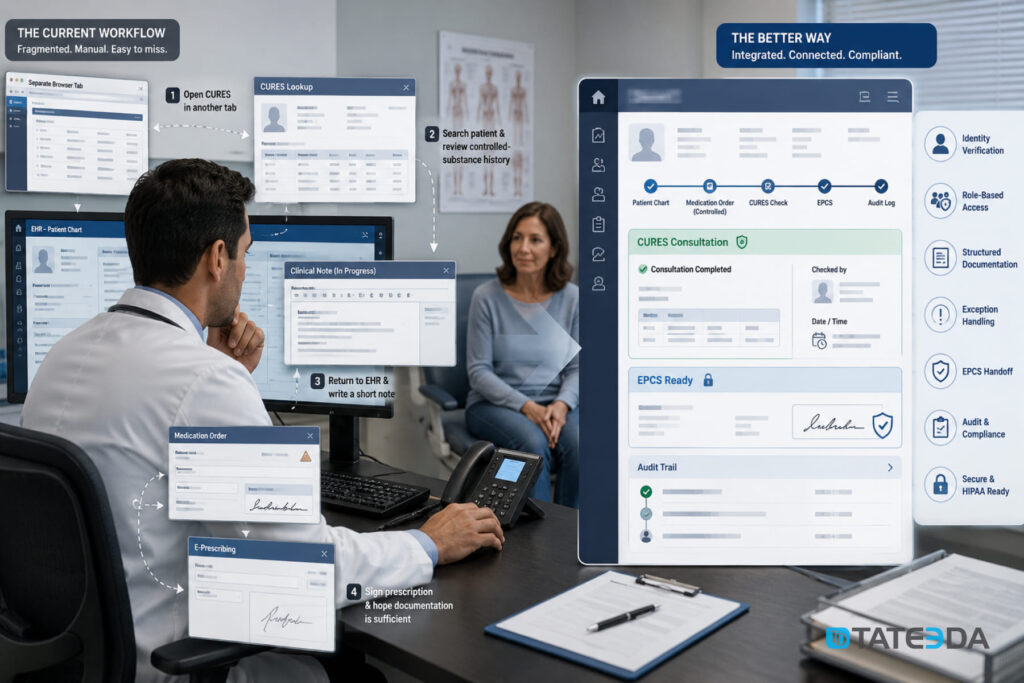
A California provider is ready to prescribe a controlled medication. The patient is in the room. The clinical note is half-finished. The medication order is open in the EHR. Then the workflow gets cumbersome and fragmented.
The provider opens CURES in a separate browser tab, searches the patient, reviews the controlled-substance history, returns to the EHR, writes a short note, signs the prescription, and hopes the documentation is clear enough if anyone reviews it later.
That is how many practices still handle California CURES checks: legally necessary, clinically important, but poorly connected to the software used every day.
For a modern EHR or digital health record platform, integration with California CURES is not just a compliance add-on. It is a prescribing workflow, an identity workflow, an access-control workflow, and an audit workflow. When built poorly, it creates extra clicks and weak records. When built well, it helps providers make safer prescribing decisions while giving the practice a clear compliance trail.
This article explains what California medical practices need to build into an EHR system for CURES-related workflows, including controlled-substance prompts, e-prescribing, delegate access, audit logs, direct dispensing reporting, and role-based security.
| Key takeaways: ✅ California CURES workflows should sit inside the controlled-substance prescribing flow, not beside it in a separate manual routine. ✅ A CURES-ready EHR should record who checked CURES, when the check happened, which patient it related to, and which prescribing event triggered it. ✅ CURES consultation and controlled-substance dispensing reporting are different workflows. A custom EHR should not treat them as the same technical feature. ✅ Delegate access can reduce provider workload, but it requires careful permissions, agreements, and activity logs. ✅ California practices that directly dispense controlled substances may need additional reporting support through PMP Clearinghouse and ASAP 4.2B-compatible data handling. ✅ For custom EHR or DHR platforms, CURES logic should be planned during prescribing architecture design, not added after the medication module is already live. |
Why is TATEEDA qualified to talk about California CURES integration?
TATEEDA is headquartered in San Diego, California, so this topic is not abstract for us. We work in the same regional healthcare market where providers deal with HIPAA, CCPA, EHR workflows, telehealth, controlled-substance prescribing rules, patient portals, and multi-role clinical operations every day.
Our California and U.S. healthcare software development services include systems where security, access logic, clinical usability, and operational reporting have to work together. In practice, that means we have worked with:
- patient portals and medical mobile apps;
- remote monitoring and IoT-connected healthcare tools;
- pharmacy automation and prescription-related workflows;
- patient payment portals and healthcare billing systems;
- custom AI software solutions including AI agents and chatbots;
- healthcare workforce platforms with complex roles, permissions, and reporting needs.
One of the strongest examples is our work with Aya Healthcare, one of the largest travel nurse staffing companies in the United States. That experience gave us firsthand exposure to high-volume healthcare workflows, permission-sensitive user roles, operational reporting, and systems that must stay usable for large, busy teams.
CURES integration sits in that same practical zone. It is not just a technical API question or a compliance checkbox. It touches how providers prescribe, how staff support providers, how access is controlled, how actions are logged, and how the EHR records a defensible clinical workflow. That is where TATEEDA’s California-based healthcare software experience becomes relevant: building systems that connect regulation, security, daily clinical work, and clean software architecture without adding more friction for medical teams.

Table of Contents
What is California CURES?
CURES stands for Controlled Substance Utilization Review and Evaluation System. It is California’s prescription drug monitoring program for controlled substances.
In practice, CURES gives authorized users access to a patient’s controlled-substance prescription history. This can help providers identify prescribing risks before issuing or continuing certain medications.
For medical practices, the most practical point is simple: CURES is not a general medication list. It is a controlled-substance history system. Your EHR still needs medication reconciliation, medication history, allergy checks, drug interaction alerts, and e-prescribing records. CURES adds another layer: review of controlled-substance dispensation history under California rules.
That distinction matters because the EHR should not try to copy the entire CURES experience. It should support the provider’s prescribing workflow and document the CURES-related steps that matter.

If you require technical assistance with integrating CURES to your EHR solution, please contact our IT experts for individualized project consultation!
When are California prescribers required to check CURES?
California’s mandatory consultation requirement generally applies when a healthcare practitioner prescribes, orders, administers, or furnishes a Schedule II, Schedule III, or Schedule IV controlled substance to a patient for the first time. If the substance remains part of treatment, CURES must generally be checked at least once every six months afterward, unless an exemption applies.
This is where software design becomes important.
A provider should not have to remember every timing rule manually. The EHR can detect whether a controlled medication is being ordered, check whether the patient already has recent CURES documentation in the chart, and prompt the provider when review is likely required.
However, the EHR should not act like legal counsel. Exemptions, professional-board rules, and special cases belong to the practice’s compliance leadership and licensing-board guidance. The software should help trigger, record, and review the process. It should not hide the provider’s responsibility behind a black-box automation rule.
CURES consultation vs. controlled-substance reporting
Many teams confuse two different workflows.
CURES consultation means a provider or authorized user reviews the patient’s controlled-substance history before or during a prescribing decision.
Controlled-substance reporting means a pharmacy, clinic, direct dispenser, or other reporting entity submits dispensing data to the state system or its vendor.
Both involve CURES. They are not the same product feature.
| Workflow | Who it affects | What the EHR should support |
|---|---|---|
| CURES consultation | Prescribers and authorized clinical users | Prompts, patient matching, lookup documentation, exception notes, audit logs |
| Delegate access | Providers and approved staff | Role limits, authorizing user relationship, activity records, revocation workflow |
| Direct dispensing reporting | Clinics or prescribers that dispense controlled substances directly | Dispensing data capture, submission preparation, error handling, reporting dashboard |
| Pharmacy reporting | Pharmacies and dispensing systems | Usually handled by pharmacy software or PMP Clearinghouse workflows |
A private practice that only prescribes may mainly need consultation prompts and documentation. A practice that directly dispenses controlled substances may also need structured reporting support. A custom EHR should make this difference clear from the beginning.
What a CURES-ready EHR workflow should include
A CURES-ready EHR workflow should reduce friction without making the process vague. The goal is not to bury the check. The goal is to make it visible, traceable, and hard to miss.
| Workflow element | What it means in practice |
|---|---|
| Prescriber identity | The system identifies the prescribing user, role, license context, and DEA-related prescribing status where applicable. |
| Patient matching | The EHR confirms patient demographics before the CURES-related step is triggered or documented. |
| Controlled-substance detection | The medication module identifies Schedule II-IV prescribing events and applies California-specific prompts. |
| CURES consultation prompt | The provider receives a clear prompt when CURES review is likely required. |
| Recent-check awareness | The EHR checks whether a relevant CURES review was documented recently enough for the current clinical context. |
| Delegate workflow | Approved staff can support the process where permitted, with clear association to the authorizing provider. |
| Structured documentation | The system records user, timestamp, patient, prescription context, status, and notes without relying only on free text. |
| Exception handling | The user can document an outage, an exemption, an emergency context, or any other reason the standard path was not completed. |
| EPCS handoff | The CURES step fits naturally before electronic signing of a controlled-substance prescription. |
| Audit dashboard | Compliance leads can review CURES-related activity by provider, patient, medication, and date range. |
This is not a large feature from a screen-design perspective. It is a sensitive feature from a workflow-design perspective.
How CURES fits with EPCS and e-prescribing
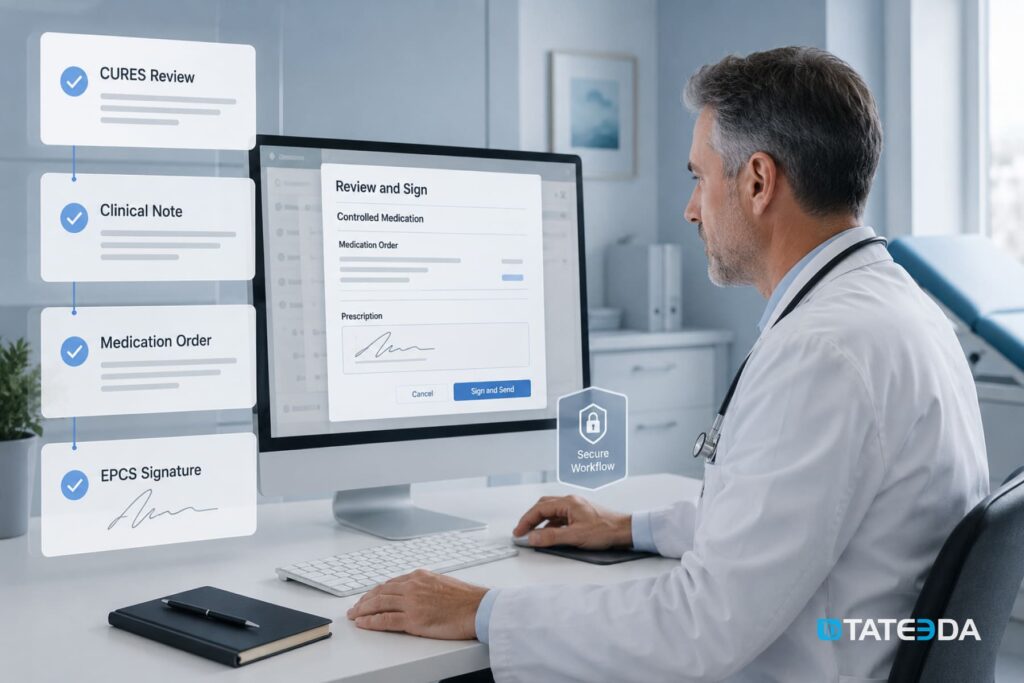
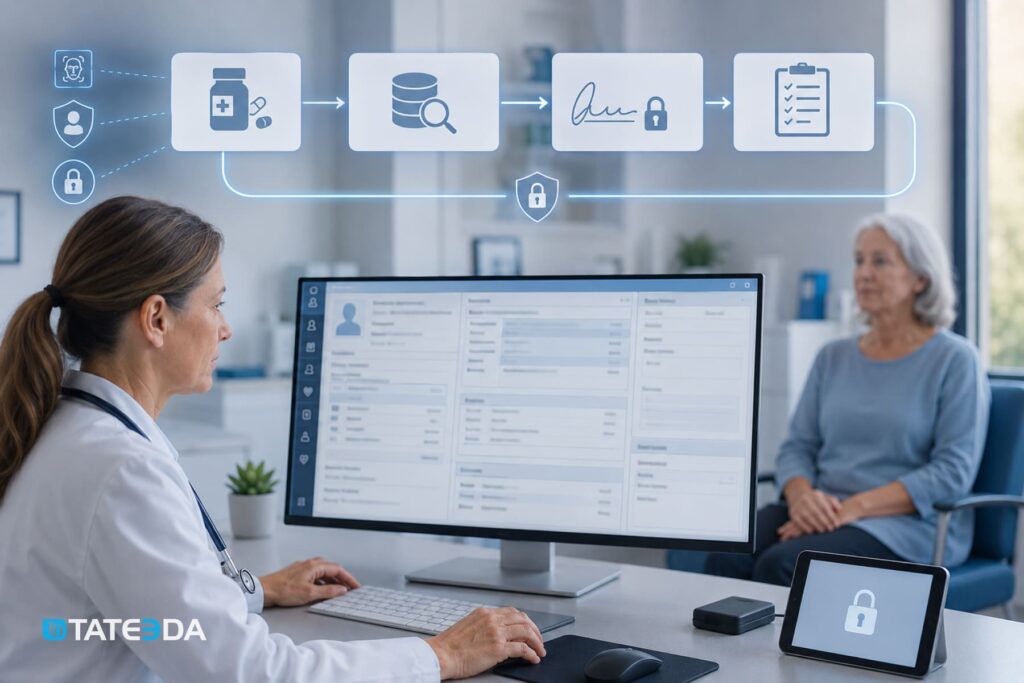
CURES review should sit before or beside the electronic prescribing of controlled substances (EPCS) step. It should not appear after the provider has already signed the prescription.
A typical flow might look like this:
- Provider selects a controlled medication.
- EHR detects the medication schedule.
- System checks patient and provider context.
- Provider receives a CURES consultation prompt if required.
- Provider or authorized delegate completes the CURES-related step.
- EHR records structured consultation metadata.
- Provider proceeds to EPCS identity proofing and signing.
- Prescription, clinical note, and CURES documentation remain linked.
The important detail: the CURES record should not be hidden in a vague sentence like “CURES checked.” That may be better than nothing, but it is weak for reporting and internal review.
A better design stores structured fields: check date, check status, user, provider, patient, medication order, exception type if applicable, and chart location. The practice can then search, audit, and produce reports without asking staff to read hundreds of notes manually.
Security and access controls for CURES-related features
CURES-related workflows touch sensitive controlled-substance history. In an EHR, this means the access model must be stricter than ordinary chart viewing.
A secure implementation should include:
- role-based access for providers, delegates, compliance admins, and billing or support staff;
- multi-factor authentication for users who handle prescribing and controlled-substance workflows;
- detailed logs for CURES-related prompts, documentation, overrides, and exceptions;
- separation between prescribing permission and general chart access;
- session timeout for high-risk workflows;
- admin tools for disabling access immediately after staff departure;
- review dashboards for unusual activity patterns;
- encrypted storage for all related metadata.
The point is not to store more CURES data than needed. The point is to document that the required workflow happened and that the right user performed the right action at the right time.
Delegate access: useful, but not casual
Delegate support can save providers time, especially in high-volume clinics. But delegation should never look like shared login access or informal staff assistance.
A CURES-ready EHR should treat delegates as a governed role with boundaries.
The system should record:
- who authorized the delegate;
- which provider the delegate supports;
- when access was granted;
- whether the delegate agreement is active;
- what actions the delegate performed;
- which patient and prescribing event the activity involved;
- when access was revoked.
For clinics with staff turnover, this is not optional architecture. A former employee with lingering access to sensitive workflows is not a software inconvenience. It is a compliance risk.
What to build if the practice directly dispenses controlled substances
Some practices prescribe controlled substances. Others directly dispense them. The second category needs more than a CURES consultation prompt.
A direct dispensing workflow may need to capture:
- dispensing date;
- patient identity;
- prescriber identity;
- medication name, strength, dosage form, quantity, and days supply;
- prescription number or internal reference;
- payment method where required;
- correction status;
- submission status;
- rejection reason if the report fails validation.
The EHR should also support a reporting queue. Staff should be able to see pending, submitted, rejected, corrected, and resubmitted records.
If the practice has no direct dispensing, this module may not be needed. But if it does dispense controlled substances, reporting logic should be treated as a separate feature, not as a side note in the prescribing screen.
CURES integration architecture for a custom EHR
A custom EHR or DHR platform should treat CURES as part of the controlled-substance safety layer.
A practical architecture may include these components:
| Component | Purpose |
|---|---|
| Provider identity layer | Connects prescribing actions to verified provider identity and role permissions. |
| Patient matching layer | Reduces lookup and documentation errors caused by mismatched demographics. |
| Medication rules layer | Detects controlled-substance orders and applies California-specific prompts. |
| CURES workflow layer | Guides consultation, delegate support, exception handling, and documentation. |
| EPCS/eRx layer | Connects CURES-related steps with prescription signing and transmission. |
| Audit logging service | Stores immutable records of CURES-related activity. |
| Reporting module | Supports direct dispensing data preparation where needed. |
| Compliance dashboard | Gives practice leadership searchable visibility into activity and gaps. |
A simple workflow diagram for the product team:
Patient chart → medication order → controlled-substance detection → CURES prompt → consultation documentation → EPCS signing → audit log
The earlier this is planned, the cleaner the system becomes. If the prescribing module is already live and CURES logic is added later, the team may have to rework permissions, medication data, audit storage, and note templates.
Common mistakes in CURES EHR implementation
The most common error is treating CURES as an external link. A button that opens CURES may help, but it does not create a complete workflow.
Other mistakes include:
- documenting CURES review only in free text;
- failing to connect the check with a specific prescription;
- giving delegates broad access without clear user boundaries;
- forgetting exception handling for outages or exemptions;
- mixing consultation and direct dispensing reporting into one feature;
- missing audit reports for compliance leadership;
- failing to revoke access during staff offboarding;
- adding CURES logic after EPCS is already built;
- building a California EHR without California-specific controlled-substance rules.
These mistakes are not rare because teams are careless. They happen because prescribing workflows look simple from the outside. In practice, they combine medical judgment, state rules, identity control, controlled-substance safety, patient matching, and audit readiness.
Build vs. configure: when custom development makes sense
A standard EHR configuration may be enough for a small practice with basic prescribing needs, no direct dispensing, no custom patient portal, and no special California workflow requirements beyond ordinary CURES use.
Custom development becomes more relevant when the practice needs:
- a custom EHR or DHR platform;
- a secure patient portal messenger connected to chart activity;
- EPCS and CURES-related documentation in one prescribing flow;
- telehealth prescribing workflows;
- direct dispensing reporting support;
- behavioral health, pain management, addiction medicine, or specialty prescribing scenarios;
- advanced staff and delegate roles;
- audit dashboards for multi-location practices;
- post-visit summaries and controlled medication education;
- custom integrations with billing, lab, and pharmacy systems.
In other words, CURES itself may not require a custom EHR. But if you are already building a custom EHR, CURES logic should not be an afterthought.
Where TATEEDA can help
TATEEDA is headquartered in San Diego and builds HIPAA-compliant healthcare software for U.S. providers, healthtech companies, pharma businesses, and medical operations teams.
For California practices building custom EHR or DHR platforms, TATEEDA can help design and develop secure prescribing workflows, role-based access, audit logs, EPCS-ready architecture, FHIR/HL7 data exchange, patient portals, telehealth modules, billing tools, and integration-ready healthcare software.
CURES-related legal interpretation should stay with counsel, compliance leadership, and the relevant licensing board. TATEEDA’s role is engineering: architecture, implementation, testing, documentation, and secure workflow design.
Frequently asked questions
Does CURES replace medication history inside the EHR?
No. CURES is focused on controlled-substance prescription history. The EHR still needs its own medication list, medication reconciliation workflow, allergies, prescribing records, and clinical notes.
Can CURES be fully automated inside an EHR?
Some surrounding steps can be guided, documented, and connected to the prescribing workflow. However, the provider’s responsibility, access rules, and clinical decision-making still matter. The EHR should support the process, not make it invisible.
Do all California practices need CURES integration?
Not every practice needs the same level of CURES-related software support. Practices that prescribe Schedule II-IV controlled substances have the clearest need for consultation prompts and documentation. Practices that directly dispense controlled substances may need additional reporting workflows.
What is the difference between CURES consultation and CURES reporting?
Consultation means reviewing a patient’s controlled-substance history before prescribing when required. Reporting means submitting controlled-substance dispensing data. These workflows have different users, different data, and different technical requirements.
What should an EHR record after a CURES check?
A good EHR record should include the patient, provider, user who performed or documented the step, timestamp, controlled-substance prescription context, status, and exception reason if the normal workflow was not completed.
Why does CURES matter for telehealth?
Telehealth can make controlled-substance prescribing more sensitive because identity, consent, visit type, prescription context, and follow-up documentation all happen through digital systems. A custom telehealth-enabled EHR should connect the visit, chart, CURES-related workflow, EPCS, and audit trail in one controlled flow.
Final thoughts
California CURES integration is not just another checkbox in EHR development. It sits at the point where clinical safety, state prescribing rules, user identity, patient privacy, and provider workflow meet.
A weak implementation adds one more tab to an already crowded day. A strong implementation gives the provider a clear prompt, records the action in structured form, respects delegate boundaries, connects with EPCS, and gives compliance leaders a useful audit view.
For California medical practices planning a custom EHR, DHR, telehealth platform, or prescribing module, the best time to design CURES-related workflows is before the medication module is built. Waiting until after launch usually means more rework, more staff friction, and more compliance ambiguity.
If your organization is planning a custom healthcare platform for California providers, TATEEDA can help you map the prescribing architecture, integration logic, access model, and audit trail before the first sprint begins.




![8 Medical Billing Automation Developers in California [2026]](https://tateeda.com/wp-content/uploads/2026/10/Cover.png)
