Top AI Agent Uses for Healthcare Websites and Patient Portals

Slava Khristich



Vlad Nazarov

| In this article, we explain how healthcare organizations can use AI agents across websites, patient portals, chatbots, and voice channels to support scheduling, intake, refill requests, portal navigation, post-discharge follow-up, multilingual access, and more. You’ll also see how these agents are built with HIPAA-aware architecture, FHIR-based integrations, approved content, escalation paths, sample backend prompts, and practical KPIs for measuring real operational value. |
Healthcare websites, patient portals, chatbots, and voice lines are becoming operational front doors, not just digital brochures. Patient access to online records and portal features continues to expand, while portal messaging and digital service demand are adding workload for care teams. That is why interest in the AI healthcare chatbot, patient portal AI, and HIPAA-compliant AI categories has moved from experimentation to production planning.
The highest-confidence pattern is simple: the best healthcare AI agents do narrow jobs well. Administrative FAQ agents, scheduling agents, pre-visit intake, refill agents, and portal copilots usually deliver the fastest ROI because they reduce repetitive work without making independent clinical decisions. Symptom intake, chronic-care coaching, and after-hours voice triage can create more strategic value, but they also carry more clinical and governance risk and should be built with tighter guardrails, escalation paths, and auditability.
Technically, most serious deployments now sit on standards-based data access, especially FHIR R4, SMART on FHIR, and, for workflow-triggered interventions, CDS Hooks. Common cloud data layers include AWS HealthLake and Cloud Healthcare API, but HIPAA still follows a shared-responsibility model: a BAA is necessary, not sufficient, and teams still need access controls, risk analysis, de-identification where possible, audit logs, and careful handling of website tracking technologies.
Table of Contents
Why healthcare web agents matter now
For CTOs and product leaders, the real question is not whether AI can answer a question on a website. It is whether an agent can complete the next useful step safely: book the visit, collect the intake, surface the result, route the symptom, document the follow-up, or move a refill request into the right workflow. In healthcare, disconnected chat widgets usually disappoint; EHR integration and operational tooling are what turn a demo into a working service layer.
That matters because the digital front door is getting heavier. ASTP/ONC’s latest patient-access brief shows continued progress in portal and app use, while hospitals have broadly expanded patient engagement capabilities such as viewing notes, securely messaging teams, and submitting patient-generated data. At the same time, the literature on portal messaging describes growing inbox burden and burnout risk, which makes automation attractive—if it is grounded, reversible, and easy to escalate.
How HIPAA-compliant agents are usually built
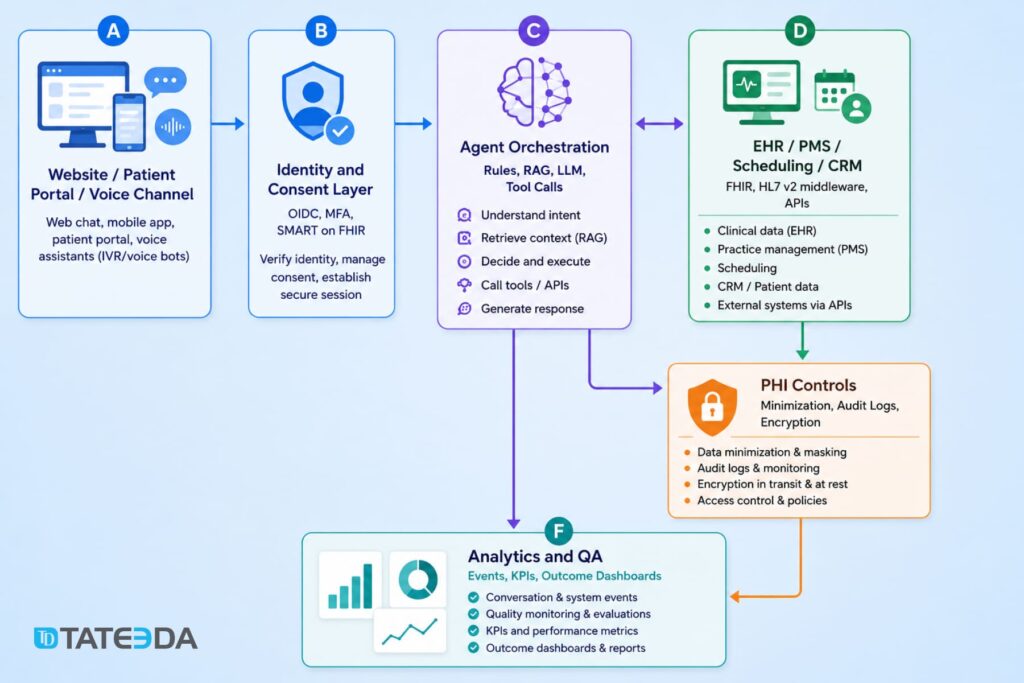
A production-grade healthcare agent usually has five layers: channel, identity, orchestration, clinical systems, and analytics. The channel might be a website chatbox, patient portal, secure messaging surface, or phone line. Identity is often OIDC plus portal authentication, ideally with scoped access via SMART on FHIR for patient-specific data. Orchestration combines deterministic workflows, retrieval, rules, and an LLM. The clinical systems layer includes EHR, PMS, call-center tools, and scheduling systems. Analytics captures containment, latency, escalation, and downstream outcomes.
In practice, teams typically combine a structured clinical data layer like AWS HealthLake or Cloud Healthcare API with a BAA-backed model tier — Azure-hosted models under Microsoft’s HIPAA offering being one common choice. Agent logic is best governed through a dedicated framework or workflow engine rather than letting a model improvise each step. Google’s agent stack is available in enterprise settings, though PHI handling still depends on which services are in scope, how they’re configured, and what your BAA actually covers.
HIPAA architecture starts before model selection. HHS guidance makes clear that business associates are directly relevant to outsourced processing, risk analysis is a required discipline, and de-identification remains a specific, governed method rather than an ad hoc masking habit. HHS has also published guidance on online tracking technologies, which matters for healthcare websites that mix chat, analytics, and appointment flows. On the AI side, NIST’s AI Risk Management Framework and ONC’s HTI-1 transparency rules give healthcare teams a practical direction for model governance, monitoring, and explainability—especially if an agent influences care decisions or clinical documentation.
1. Administrative self-service agent
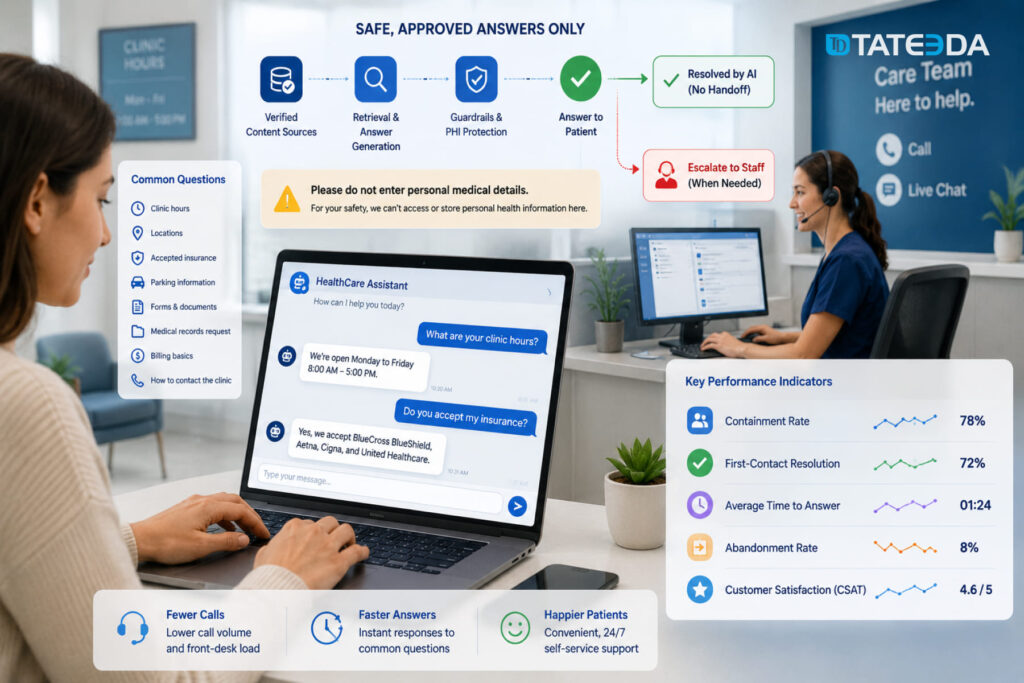
This is the classic AI healthcare chatbot for low-acuity service questions: hours, locations, accepted insurance, parking, forms, medical records requests, billing basics, and “how do I contact the clinic?” The typical journey starts on a public site or portal landing page, stays mostly in approved content, and only escalates to staff when the user asks something account-specific or off-script.
The safest architecture is retrieval over approved FAQs and policy content, plus a simple handoff to scheduling or contact-center tools. The main risk is not clinical error; it is accidental PHI collection on a public surface, poor analytics hygiene, or giving the bot too much freedom. A useful KPI set is containment rate, first-contact resolution, time to answer, abandonment, and CSAT. The win comes from call deflection and reduced front-desk interruptions.
Implementation checklist for an administrative self-service agent
| Checklist item | What it means in practice |
|---|---|
| Approve a source corpus | Use only verified FAQs, service pages, policy pages, insurance info, location data, and contact-center scripts. |
| Block diagnostic advice | Make sure the agent does not answer clinical questions, interpret symptoms, or suggest treatment. |
| Define escalation intents | Route billing, account-specific, clinical, insurance-specific, and low-confidence cases to staff. |
| Add PHI warnings on public pages | Add prompts like: “Please don’t enter personal medical details here.” |
| Scrub free-text PHI where possible | Detect and mask names, dates of birth, record numbers, phone numbers, and other sensitive details. |
| Review third-party scripts and trackers | Check analytics, pixels, chatbot scripts, and session tools before launch. |
| Log conversations carefully | Store only what is needed for QA, support, and reporting. Avoid unnecessary identifiers. |
| Create a staff review process | Let staff review unanswered, unclear, or low-confidence questions and improve the source content. |
Example backend prompt for an administrative self-service agent
A production administrative self-service agent still needs approved content, public-page privacy controls, contact-center handoff, analytics review, and careful tracking setup. This simplified prompt shows the safe boundary: the agent can answer routine service questions, but clinical topics, personal account issues, and sensitive requests move to secure staff workflows.
You are an administrative self-service assistant for a healthcare website.

Your job is to answer low-risk service questions about:
- clinic hours
- locations
- parking
- accepted insurance
- forms
- billing basics
- medical records requests
- contact options
- how to schedule or reach staff

Use only approved clinic content, FAQ pages, policy pages, service pages, and contact-center scripts.

Do not answer clinical questions, diagnose, interpret symptoms, explain lab results, recommend treatment, or give medication advice.

Do not ask users to enter personal medical details on public website pages. If a user shares personal health information, keep the response general and route them to the correct secure channel.

Route these cases to staff:
- account-specific billing questions
- medical record access issues
- insurance exceptions
- complaint or escalation requests
- clinical questions
- urgent symptoms
- low-confidence answers
- anything outside the approved knowledge base

If the user asks to book, cancel, or reschedule an appointment, route them to the scheduling flow or contact-center handoff.

Keep replies short, clear, and practical. When unsure, do not guess. Route the user to staff.
Recommended tech stack for building an administrative self-service agent
- Analytics layer: containment rate, handoff rate, unresolved questions, CSAT, and abandonment tracking
- Chat layer: IBM WatsonX Assistant or Amazon Lex
- Knowledge layer: approved FAQ, service, policy, insurance, billing, and location content
- Retrieval layer: RAG with strict source grounding and low-confidence fallback
- Integration layer: AWS Lambda or similar API middleware for contact forms, scheduling, CRM, or support tools
- Support handoff: Zendesk, Salesforce Service Cloud, HubSpot, Intercom, Twilio Flex, or Amazon Connect
- Automation layer: Automation Anywhere for back-office tasks like eligibility checks, request routing, and repetitive admin workflows
- Security layer: PHI masking, access rules, audit logging, encryption, and tracker review
2. Appointment scheduling agent
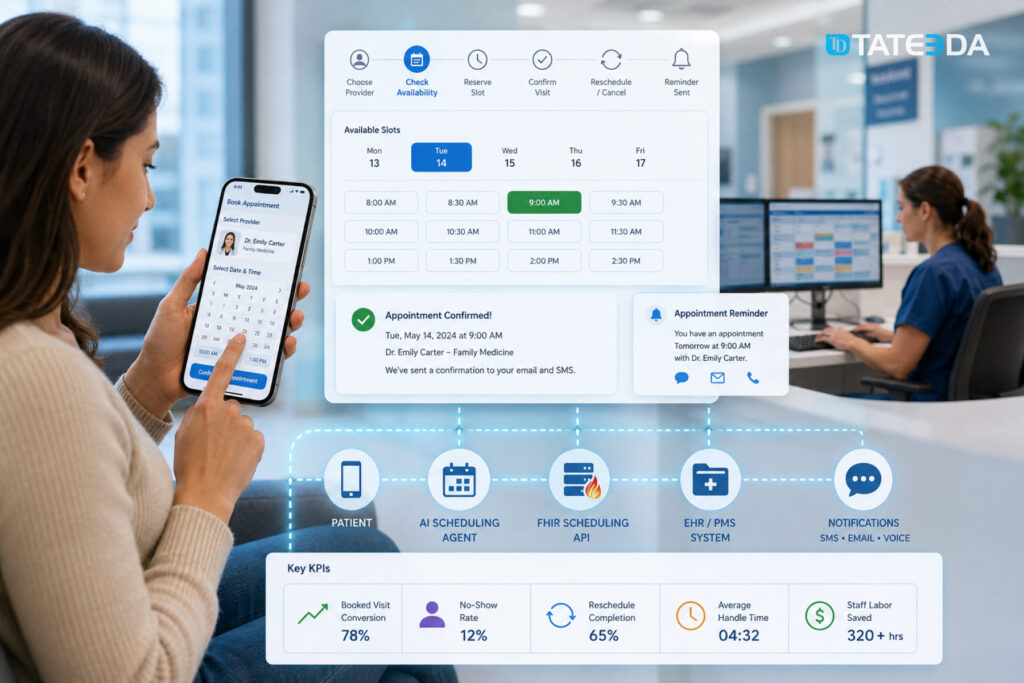
Scheduling agents are one of the clearest ROI cases because the user journey is binary and measurable: pick a provider, verify availability, reserve a slot, confirm, reschedule, or cancel. The ideal pattern uses transactional booking logic against scheduling APIs or FHIR scheduling resources rather than letting the LLM “pretend” a booking succeeded. FHIR’s scheduling profile and the Appointment resource are designed exactly for this sort of workflow.
Reminder evidence is also strong: systematic reviews show appointment reminders improve attendance and help patients cancel or reschedule unwanted visits. Risks are mostly operational—identity mismatch, slot collisions, double-booking, or unclear escalation for urgent symptoms. Strong KPIs are booked-visit conversion, no-show rate, reschedule completion, average handle time, and staff labor saved.
| Checklist item | What it means in practice |
|---|---|
| Connect to scheduling data | Use EHR/PMS scheduling APIs or FHIR Schedule, Slot, and Appointment resources instead of letting the AI invent availability. FHIR defines a Slot as a bookable time and an Appointment as a planned healthcare event. |
| Use hold-and-book logic | Temporarily reserve a slot before final confirmation to prevent double-booking. |
| Verify patient identity | Confirm name, date of birth, phone/email, or portal login before account-specific actions. |
| Match visit type to rules | Map specialty, provider, location, insurance, visit reason, and telehealth/in-person rules before offering slots. |
| Confirm every booking action | Ask the user to confirm before booking, canceling, or rescheduling. |
| Send reminders | Use EHR/PMS scheduling APIs or FHIR Schedule, Slot, and Appointment resources instead of letting the AI invent availability. FHIR defines a Slot as a bookable time and an Appointment as a planned healthcare event. |
| Capture cancellation reasons | Collect simple reasons like “recovered,” “schedule conflict,” “transportation,” “insurance,” or “cost concern.” |
| Define urgent escalation | If the patient mentions severe symptoms, route them away from booking logic and into urgent-care guidance or human triage. |
| Log booking events | Track attempted bookings, completed bookings, failed bookings, cancellations, reschedules, and handoffs. |
| Test slot collision cases | Run QA for double-clicks, expired slots, concurrent users, time-zone issues, and provider schedule changes. |
Example backend prompt for an appointment scheduling agent
A production scheduling agent still needs identity checks, EHR or PMS scheduling access, transactional booking logic, slot locking, confirmation handling, reminders, audit logs, and staff fallback. This simplified prompt shows the core boundary: the agent can help patients book, cancel, or reschedule visits, but every appointment action must come from the scheduling system, not from the model’s own assumptions.
You are an appointment scheduling assistant for a healthcare organization.

Your job is to help authenticated or verified patients:
- find the right provider or service
- check available appointment slots
- book an appointment
- reschedule an appointment
- cancel an appointment
- receive reminders and confirmation details

Use only approved scheduling data from the EHR, PMS, scheduling API, or FHIR scheduling resources.

Do not invent appointment availability. Do not confirm a booking unless the scheduling system returns a successful confirmation.

For each booking request:
1. Confirm the visit type, location, provider preference, and time preference.
2. Check real availability through the scheduling system.
3. Offer only available slots.
4. Temporarily hold the selected slot where possible.
5. Ask the patient to confirm.
6. Complete the booking only after confirmation.
7. Send the appointment details and reminder options.

Route these cases to staff:
- identity mismatch
- insurance or referral uncertainty
- unavailable visit type
- failed booking
- slot conflict
- repeated rescheduling
- patient mentions urgent symptoms
- patient asks for medical advice

If the patient reports urgent symptoms, stop scheduling and route them to nurse triage, urgent care guidance, or emergency instructions according to clinic policy.

Keep replies short, clear, and practical. When unsure, do not guess. Route the case to staff.
Recommended tech stack
- Chat or voice layer: IBM WatsonX Assistant, Amazon Lex, or a custom LLM-based assistant
- Contact-center layer: Amazon Connect, Amazon Connect Health, Twilio Flex, or an existing call-center system
- Scheduling layer: EHR/PMS scheduling APIs or FHIR Schedule, Slot, and Appointment resources
- Integration layer: AWS Lambda, API Gateway, Mirth Connect / NextGen Connect, or custom middleware
- Notification layer: Twilio, SendGrid, Amazon SNS, portal messages, or EHR-native reminders
- Identity layer: OIDC, MFA, patient portal login, or SMART on FHIR, where EHR access is needed
- Automation layer: Automation Anywhere for back-office routing, eligibility checks, and follow-up task creation
- Security layer: PHI minimization, audit logs, encrypted data exchange, consent handling, and role-based access
- Analytics layer: booked-visit conversion, no-show rate, reschedule completion, handoff rate, average handle time, and staff hours saved.
3. Symptom intake and care routing agent
This is where teams often overreach. A symptom-routing agent should collect symptoms, identify red flags, and route the patient to the right care channel; it should not market itself as a diagnostic engine. Peer-reviewed reviews of symptom checkers consistently report variable and often limited diagnostic and triage accuracy, and FDA guidance around clinical decision support underscores the need for clear scope and transparency. The strongest design pattern is deterministic triage first: a guided intake, red-flag rules, structured outputs, and a conservative escalation path to nurse triage, urgent care, or ED instructions. If you use free-text reasoning, keep it narrow and auditable. Useful KPIs include safe-disposition agreement, escalation capture, nurse time deflection, and time-to-routing.
Implementation checklist for a symptom intake and care routing agent
| Checklist item | What it means in practice |
|---|---|
| Define emergency vs. non-emergency boundaries | Make it clear when the agent should stop intake and tell the patient to call emergency services, contact nurse triage, or seek urgent care. |
| Use evidence-based triage trees | Build guided symptom flows around approved clinical protocols, not open-ended LLM reasoning. |
| Keep the agent non-diagnostic | The agent should collect symptoms and route the patient, not diagnose, prescribe, or tell the patient what condition they likely have. FDA guidance treats some clinical decision support functions differently depending on intended use, transparency, and whether they meet device criteria. |
| Structure intake with forms | Use structured forms for symptom duration, severity, location, age group, pregnancy status, medication context, and red-flag answers. FHIR Questionnaire and QuestionnaireResponse are suitable for this kind of intake because they capture questions, answers, order, status, patient context, and related encounter data. |
| Add red-flag rules | Hard-code escalation for chest pain, stroke symptoms, breathing difficulty, severe bleeding, suicidal ideation, high fever in infants, and other dangerous patterns. |
| Log confidence and routing logic | Store why the agent routed the case to nurse triage, urgent care, routine scheduling, or emergency instructions. |
| Test dangerous edge cases | Run QA for ambiguous symptoms, mixed low/high-risk signals, missing data, elderly patients, pediatric cases, and users who minimize symptoms. |
| Keep human escalation immediate | A nurse, clinician, or contact-center team should be one click away when the patient’s input is unclear, risky, or outside the agent’s approved scope. |
| Review outputs with clinicians | Have clinical staff review sample conversations, routing decisions, unsafe answers, and false reassurance risks before launch. |
| Monitor safety KPIs after release | Track red-flag capture, escalation rate, nurse override rate, unsafe response rate, and safe-disposition agreement. |
Example backend prompt for a symptom intake and care routing agent
A production symptom intake agent still needs approved triage protocols, red-flag rules, audit logging, clinician review, emergency escalation paths, and careful FDA/SaMD scope analysis where relevant. This simplified prompt shows the core boundary: the agent can collect symptoms and route care, but it should not diagnose, reassure, or make clinical decisions on its own.
You are a symptom intake and care routing assistant for a healthcare organization.

Your job is to collect symptom information, identify red flags, and route patients to the right care channel.

You may ask structured intake questions about:
- main symptom
- symptom duration
- severity
- age group
- recent changes
- relevant risk factors
- urgent warning signs

Do not diagnose, name likely conditions, recommend treatment, prescribe medication, or tell the patient what they “probably” have.

Use only approved triage rules, red-flag logic, clinic routing policies, and care-team instructions.

Route the patient to the appropriate next step:
- emergency care
- urgent care
- nurse triage
- telehealth visit
- routine appointment
- staff callback

Immediately escalate if the patient reports:
- chest pain
- severe breathing difficulty
- stroke-like symptoms
- severe allergic reaction
- severe bleeding
- suicidal thoughts
- sudden confusion
- high-risk symptoms in infants, pregnancy, elderly patients, or immunocompromised patients

Ask short, structured questions. Keep free-text reasoning limited and auditable.

If the patient’s answers are unclear, incomplete, risky, or outside the approved routing rules, do not guess. Route the case to nurse triage or staff review.

Keep replies calm, plain, and practical. Remind the patient that this assistant does not provide diagnosis.
Recommended tech stack for building a symptom intake and care routing agent
- Chat or voice layer: IBM WatsonX Assistant, Amazon Lex, or a custom conversational interface
- Structured intake layer: FHIR Questionnaire and QuestionnaireResponse, dynamic forms, branching logic
- Rules layer: deterministic triage rules, red-flag detection, escalation thresholds
- EHR / portal integration: SMART on FHIR, FHIR APIs, or middleware for older HL7 v2 environments
- Clinician review queue: nurse triage inbox, care-team dashboard, or contact-center handoff
- Security layer: PHI minimization, consent handling, audit logs, role-based access, encrypted data exchange
- QA layer: unsafe-response testing, edge-case library, clinician review, routing accuracy checks
- Analytics layer: safe-disposition agreement, escalation capture, nurse time saved, time-to-routing, abandonment rate
4. Pre-visit intake agent
Pre-visit intake agents collect visit goals, interval history, medication updates, allergies, consent, and sometimes device or symptom questionnaires before the encounter begins. The best implementations feel like smart eCheck-in, not a second registration burden. Pre-visit planning reviews show benefits for preparedness and communication, and electronic questionnaires can pull useful context forward before the visit. Technically, this pattern fits well with FHIR Questionnaires and QuestionnaireResponses, plus document upload lanes for forms and prior records. The largest risks are data quality, patient fatigue, duplication with front-desk intake, and unmapped outputs that never reach the chart. The best KPIs are completion rate, structured-field completion, rooming-time reduction, fewer follow-up calls, and fewer missing-data delays.
Implementation checklist for a pre-visit intake agent
| Checklist item | What it means in practice |
|---|---|
| Ask only what changes care or operations | Keep the intake short. Collect visit goals, changes since the last visit, medications, allergies, consent, and required specialty-specific questions. Avoid duplicating full registration unless the data is missing or outdated. |
| Prepopulate known fields | Pull existing demographics, medications, allergies, insurance, preferred pharmacy, and contact details from the portal or EHR so the patient only confirms or updates them. |
| Use adaptive forms | Show only relevant follow-up questions based on the patient’s answers, visit type, age group, condition, and provider rules. |
| Map outputs to chart fields | Route structured answers into the correct EHR areas: allergies, medications, reason for visit, history, consent, visit notes, or pre-rooming summary. |
| Support document upload | Allow patients to upload referral forms, prior records, images, PDFs, insurance cards, or outside test results. FHIR DocumentReference can be used to describe and index documents, including PDFs, clinical notes, images, and scanned records. |
| Add e-signature where needed | Use e-signature for consent forms, financial responsibility forms, privacy acknowledgments, and release-of-information documents. |
| Let staff review exceptions | Send missing, conflicting, risky, or low-confidence responses to front-desk staff, nurses, or care coordinators before the visit. |
| Avoid patient fatigue | Limit the number of questions, save progress, support mobile use, and avoid asking the same thing on the website, phone, and front desk again. |
| Validate data quality | Flag incomplete answers, mismatched medication names, expired insurance details, and uploads that staff cannot read. |
| Track completion and delays | Measure completion rate, field completion, upload success, rooming-time reduction, fewer follow-up calls, and fewer missing-data delays. |
Example backend prompt for a pre-visit intake agent
A production pre-visit intake agent still needs portal authentication, EHR mapping, secure document upload, consent handling, audit logs, and staff review workflows. This simplified prompt shows the core boundary: the agent can collect and organize pre-visit information, but clinical interpretation and responses involving risk remain with the care team.
You are a pre-visit intake assistant for a healthcare portal.

Your job is to help authenticated patients complete intake before their appointment.

Collect only information needed for the visit, such as:
- reason for visit
- changes since the last appointment
- current medications
- allergies
- symptoms or device readings, when required
- consent forms
- uploaded documents or prior records

Use approved clinic forms, visit-type rules, existing patient data, and care-team instructions.

Pre-fill known fields when possible. Ask the patient only to confirm or update them.

Do not diagnose, interpret symptoms, recommend treatment, or give medication advice.

Route these cases to staff:
- unclear or conflicting answers
- missing required documents
- medication or allergy concerns
- serious symptoms
- incomplete consent
- low-confidence responses
- patient asks what they should do medically

Keep questions short and easy to answer. Avoid asking the same question twice.

When the intake is complete, summarize the information for staff review and map structured answers to the correct chart fields where possible.

When unsure, do not guess. Route the intake to the care team.
Recommended tech stack for building a pre-visit intake agent
- Form layer: FHIR Questionnaire, QuestionnaireResponse, and Structured Data Capture (SDC) profiles for dynamic pre-visit forms. FHIR notes that SDC supports advanced questionnaires, prepopulation from existing clinical data, and extraction from completed QuestionnaireResponses into resources such as Observations and MedicationStatements.
- Portal layer: patient portal, mobile app, or web eCheck-in interface
- Identity layer: OIDC, MFA, portal login, or SMART on FHIR for authenticated intake
- Document layer: secure upload, OCR if needed, DocumentReference metadata, and storage for PDFs, images, prior records, and consent documents
- EHR mapping layer: API or FHIR-based mapping into allergies, medications, reason for visit, consent, visit notes, and pre-rooming summaries
- Automation layer: rules engine or Automation Anywhere for routing incomplete forms, missing documents, or staff follow-up tasks
- Security layer: PHI minimization, consent handling, audit logs, encryption, role-based access, and retention rules
- Analytics layer: completion rate, structured-field completion, upload success, rooming-time reduction, follow-up call reduction, and drop-off tracking
5. Patient portal copilot
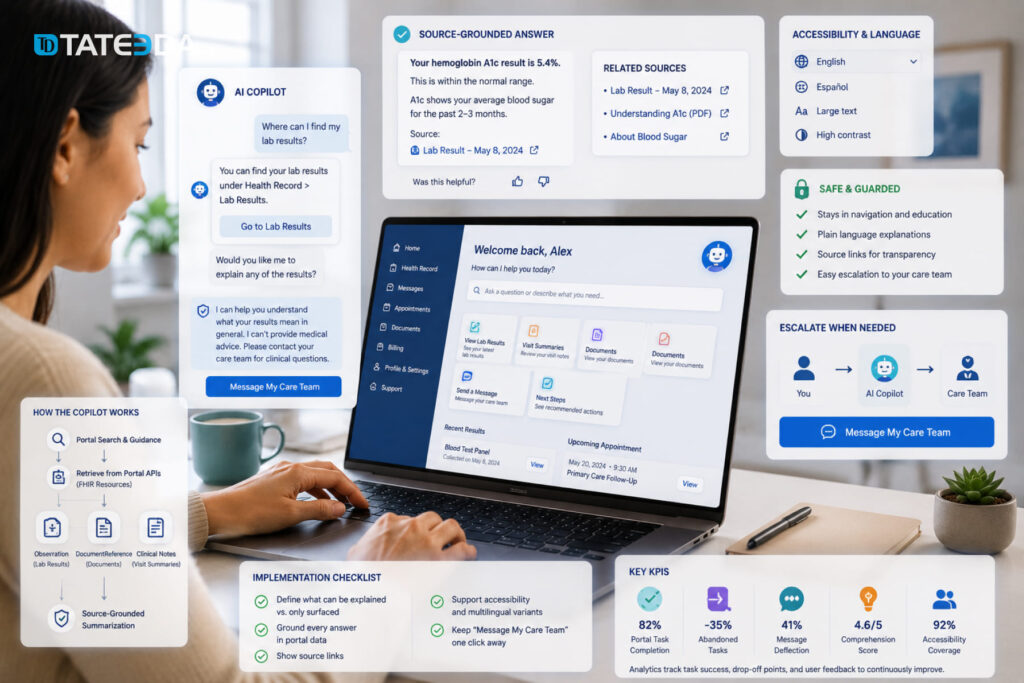
A patient portal AI copilot helps users find and understand the portal: where lab results live, what a visit summary contains, how to send a secure message, what a document means, and what the next administrative step is. This is especially valuable as portal access expands and message burden climbs. Architecturally, the best copilots blend information architecture guidance with personalized retrieval of labs, notes, and documents from portal APIs or FHIR resources such as Observation and DocumentReference. The risk is subtle: a copilot can slip from navigation into individualized clinical interpretation. Guardrails should keep explanations source-grounded, plain-language, and easy to escalate to a clinician or nurse. Good KPIs are portal task completion, fewer abandoned tasks, message deflection, comprehension scores, and accessibility by literacy or language segment.
Implementation checklist
| Checklist item | What it means in practice |
|---|---|
| Define what can be explained | Add links like “View original lab result,” “Open visit summary,” or “See uploaded document,” so the patient can verify the answer. |
| Define what can only be surfaced | Lab values, diagnoses, imaging impressions, medication changes, and clinical notes can be shown or summarized carefully, but not interpreted as personal medical advice. |
| Ground every answer in portal data | The copilot should answer from the user’s portal records, approved help content, and source-linked documents, not from open-ended model memory. |
| Show source links | Add links like “View original lab result,” “Open visit summary,” or “See uploaded document” so the patient can verify the answer. |
| Use FHIR resources correctly | Use Observation for lab and measurement data, and DocumentReference for clinical documents, PDFs, notes, and uploaded records. HL7 defines Observation as measurements and simple assertions, including lab data and vital signs, while DocumentReference is used to reference documents and related metadata. |
| Keep clinical interpretation guarded | The copilot can say where a result is, what section it belongs to, or what general terms mean. It should not say what the result means for the patient’s diagnosis or treatment. |
| Keep “message my care team” one click away | Any clinical question, confusing result, worsening symptom, or medication concern should be easy to send to a nurse or clinician. |
| Support accessibility | Include large text, screen-reader-friendly structure, plain-language mode, high contrast, and simple navigation paths. |
| Support multilingual variants | Translate portal guidance and general explanations, but route risky or clinically sensitive questions to a human interpreter or staff workflow. |
| Track drop-off and task success | Measure whether users actually find the result, send the message, open the document, complete the task, or abandon the portal flow. |
Example backend prompt for a patient portal copilot
A production patient portal copilot still needs authentication, portal API access, FHIR retrieval, audit logging, source links, accessibility support, and staff escalation. This simplified prompt shows the core boundary: the copilot can help patients find and understand portal materials, but clinical interpretation stays with the care team.
You are a patient portal copilot for a healthcare organization.

Your job is to help authenticated patients find and understand portal information, including:
- lab result locations
- visit summaries
- documents and forms
- secure messages
- appointment details
- next administrative steps

Use only approved portal help content, patient portal data, and source-linked records.

You may explain where information is located, summarize portal sections in plain language, and help the patient complete portal tasks.

Do not diagnose, interpret lab results, explain what a result means for the patient’s condition, recommend treatment, or give medication advice.

When answering, show the source whenever possible, such as:
- “Open original lab result”
- “View visit summary”
- “See uploaded document”
- “Message care team”

Route these cases to a nurse, clinician, or support team:
- clinical questions
- confusing or abnormal results
- medication concerns
- worsening symptoms
- unclear documents
- patient asks what they should do medically
- low-confidence answers

Keep “message my care team” easy to access.

Keep replies short, clear, and plain-language. When unsure, do not guess. Route the patient to the right staff workflow.
Recommended tech stack
- Portal layer: patient portal, mobile app, or authenticated web portal
- Identity layer: portal login, OIDC, MFA, or SMART on FHIR authorization for scoped access
- FHIR retrieval layer: Observation, DiagnosticReport, DocumentReference, Encounter, MedicationRequest, and CarePlan resources where relevant
- Search layer: portal search, document search, and metadata-based retrieval
- Summarization layer: source-grounded summarization with citations back to portal records
- Guardrail layer: clinical-scope rules, plain-language rules, low-confidence fallback, and care-team escalation
- Messaging layer: secure message workflow, nurse inbox, or care-team routing
- Accessibility layer: multilingual support, large text, high contrast, screen-reader support, and plain-language mode
- Security layer: PHI minimization, role-based access, audit logs, encryption, consent handling, and session timeout
- Analytics layer: task completion, drop-off points, message deflection, comprehension feedback, accessibility usage, and escalation rate
6. Post-discharge follow-up agent
Post-discharge agents contact patients after hospitalization or ED discharge to check symptoms, medications, follow-up appointments, transport barriers, and understanding of instructions. This pattern sits at the boundary between patient engagement and care transitions, so it needs tighter governance than a public FAQ bot. Reviews of post-discharge follow-up suggest that timely contact can improve transitions and may reduce near-term readmissions, although outcomes depend heavily on workflow design and patient selection.
The safest architecture is event-triggered outreach from discharge status, with script-based questions, symptom thresholds, and a nurse or care-manager escalation queue. Strong KPIs are 48–72 hour contact rate, follow-up appointment completion, medication issue resolution, and readmission trends against baseline.
Implementation checklist for a post-discharge follow-up agent
A production post-discharge agent still needs EHR discharge triggers, medication-list access, outreach channels, audit logging, staff queues, and clinical governance. This simplified prompt shows the core boundary: the agent can check understanding and collect signals, but risky answers, medication concerns, and clinical uncertainty move to nurses or care managers.
| Checklist item | What it means in practice |
|---|---|
| Trigger outreach from discharge events | Start the agent from ED discharge, inpatient discharge, or observation discharge status instead of relying on manual lists. |
| Define the contact window | Set the outreach timing clearly, for example same day, 24 hours, or 48–72 hours after discharge, depending on patient risk. |
| Ingest discharge instructions | Pull the discharge summary, diagnosis context, follow-up plan, activity limits, wound care instructions, and warning signs into the outreach flow. |
| Ingest medication lists | Compare new, changed, and stopped medications so the agent can ask whether the patient received and understands them. |
| Ask script-based questions | Use short, approved questions about symptoms, pain, fever, breathing, wound status, medication access, transport, and follow-up appointments. |
| Build symptom escalation rules | Route dangerous answers to nurse triage, care managers, urgent care guidance, or emergency instructions based on predefined thresholds. |
| Record every outreach attempt | Log calls, SMS, portal messages, completed check-ins, failed contacts, and patient responses. |
| Route nonresponse to staff | Send repeated nonresponse, disconnected numbers, language barriers, or incomplete check-ins to a human follow-up queue. |
| Support multiple channels | Use SMS, portal messages, email, and voice calls, especially for patients who do not regularly use the portal. |
| Track care-transition outcomes | Monitor contact rate, medication issue resolution, follow-up visit completion, escalation volume, and readmission trends against baseline. |
Example backend prompt for a post-discharge follow-up agent
You are a post-discharge follow-up assistant for a healthcare organization.

Your job is to contact authenticated patients after ED, inpatient, or observation discharge and help check:
- symptoms after discharge
- medication access and understanding
- follow-up appointment status
- transport or home-care barriers
- understanding of discharge instructions

Use only approved discharge instructions, care-plan rules, medication lists, follow-up appointment data, and clinic-approved scripts.

Do not diagnose, interpret symptoms as a condition, change care instructions, or give medication advice.

Ask short, script-based questions. Route these cases to a nurse or care manager:
- worsening symptoms
- pain, fever, breathing problems, wound concerns, or other red flags
- medication confusion or missing medication
- missed or unbooked follow-up visit
- transport, cost, language, or home-support barriers
- unclear or incomplete answers
- repeated nonresponse

If the patient reports urgent danger signs, stop the normal flow and tell them to call emergency services or go to the nearest emergency department.

Log every outreach attempt, response, escalation, failed contact, and completed check-in.

Keep replies calm, clear, and practical. When unsure, do not guess. Route the case to the care team.
Recommended tech stack for a post-discharge follow-up agent
- Event trigger layer: ADT discharge events, EHR discharge status, or PMS/care-management triggers
- Outreach layer: SMS, portal messaging, email, or voice through Twilio, Amazon Connect, EHR-native messaging, or similar tools
- Agent layer: script-driven chatbot or voice agent with narrow LLM support for plain-language explanations
- Clinical rules layer: symptom thresholds, red-flag logic, risk stratification, and escalation rules
- EHR data layer: discharge summary, medication list, care plan, follow-up appointments, and patient contact data
- FHIR layer: Encounter, MedicationRequest, MedicationStatement, CarePlan, CommunicationRequest, Questionnaire, and QuestionnaireResponse, where relevant
- Care-team workflow layer: nurse triage queue, care-manager dashboard, callback task creation, and unresolved-case routing
- Automation layer: Automation Anywhere or similar RPA tools for repetitive follow-up tasks, missing-document checks, and staff task routing
- Security layer: consent handling, PHI minimization, audit logs, role-based access, encryption, and BAA-covered vendors
- Analytics layer: 48–72 hour contact rate, follow-up completion, medication issue resolution, escalation capture, nonresponse rate, and readmission trend tracking
7. Medication refill and adherence agent
Refill and adherence agents are usually worth building because they sit on a repetitive, measurable process that patients understand well. The journey may include reminder outreach, refill eligibility check, status updates, side-effect flags, and escalation for exceptions. FHIR’s MedicationRequest resource is a natural anchor for the medication layer, while the literature on digital adherence interventions shows that mobile and digital tools can improve adherence in chronic disease populations. Risk rises sharply if the agent acts autonomously on controlled substances, complex titrations, or contraindication situations. The right pattern is rule-driven eligibility, pharmacist or clinician approval where required, and zero autonomous dosing advice. Good KPIs include refill turnaround time, refill completion, adherence proxy measures, message containment, and pharmacy-call reduction.
Implementation checklist for a refill and adherence agent
| Checklist item | What it means in practice |
|---|---|
| Separate simple refills from restricted medications | Let the agent handle routine refill requests, but route controlled substances, high-risk drugs, dose changes, titration plans, and contraindication cases to staff. |
| Verify patient identity | Confirm identity through portal login, MFA, or a verified patient-matching workflow before showing medication status or starting a refill request. |
| Anchor the workflow in medication data | Use the EHR, pharmacy system, or eRx source of truth. FHIR MedicationRequest is the natural resource for prescriptions, medication orders, and refill-related context. |
| Check refill eligibility | Validate remaining refills, last visit date, required labs, medication status, provider rules, payer limits, and pharmacy routing before showing the request as eligible. |
| Expose status clearly | Show whether the refill is requested, pending review, approved, denied, sent to pharmacy, or waiting on patient/staff action. |
| Block autonomous dosing advice | The agent should never tell patients to start, stop, increase, decrease, split, or combine medications. Dose questions go to clinicians or pharmacists. |
| Route side effects and safety concerns | Any side-effect report, allergy concern, pregnancy-related question, interaction concern, or “I feel worse” message should go to a clinician or pharmacist queue. |
| Add approval gates | Require pharmacist, clinician, or refill-team approval for restricted meds, overdue visits, missing labs, abnormal results, or nonstandard requests. |
| Log every approval step | Record who requested, reviewed, approved, denied, changed, or routed the refill, plus timestamps and source systems. |
| Track adherence signals carefully | Use proxy measures such as refill completion, reminder response, late refill patterns, or patient self-report, but avoid treating them as perfect proof of medication use. |
Example backend prompt for a refill and adherence agent
You are a refill and medication adherence assistant for a healthcare portal.

Help authenticated patients check refill status, request routine refills, and receive medication reminders.

Do not diagnose, prescribe, interpret lab results, or give dosing advice. Never tell a patient to start, stop, increase, decrease, or replace a medication.

Use only approved clinic data: active medication list, refill rules, pharmacy status, last visit date, required lab status, and clinic refill policy.

Route these cases to staff:
- controlled substances
- dose change requests
- side effects
- allergy or interaction concerns
- missing labs
- overdue visits
- worsening symptoms
- unclear or unsafe requests

If the patient describes urgent symptoms, stop the refill flow and tell them to call emergency services or go to the nearest emergency department.

Keep replies short, plain, and practical. When unsure, do not guess. Route the request to the care team.
Recommended tech stack for building a refill and adherence AI agent
- Chat or portal layer: patient portal widget, mobile app, IBM WatsonX Assistant, Amazon Lex, or custom conversational UI
- Medication data layer: EHR medication list, pharmacy system, eRx platform, FHIR MedicationRequest, MedicationStatement, MedicationDispense, and Medication resources
- Rules layer: refill eligibility logic, restricted-medication rules, lab/visit requirements, contraindication flags, and escalation thresholds
- Pharmacy / eRx integration: Surescripts, DrFirst, CoverMyMeds, Truepill, RxSense, or existing pharmacy workflow tools where applicable
- Notification layer: SMS, email, portal messages, push notifications, or voice reminders
- Approval workflow layer: clinician inbox, pharmacist queue, refill-team dashboard, or ticketing workflow
- Automation layer: Automation Anywhere or similar RPA for repetitive status checks, task routing, payer/pharmacy follow-up, and exception handling
- Security layer: identity verification, consent handling, PHI minimization, audit logs, encryption, BAA-covered vendors, and role-based access
- Analytics layer: refill turnaround time, refill completion, late-refill rate, reminder response, message containment, pharmacy-call reduction, and exception volume
8. Chronic care self-management agent
Chronic care agents support longer-term routines for diabetes, hypertension, COPD, heart failure, CKD, oncology support, or behavioral health check-ins. The best ones do not replace care teams; they reinforce care plans with reminders, questionnaires, home readings, education, and threshold-based escalation.
Reviews of digital health and conversational agents in chronic disease show promise, especially when tools are paired with monitoring and clinician oversight, but the evidence is still heterogeneous and should not be oversold. Architecturally, this pattern usually combines patient-generated data, structured questionnaires, care-plan content, and simple trend logic.
Risks include overconfident advice, false reassurance, alert fatigue, and inequities in digital engagement. Useful KPIs are engagement cadence, submission of readings, goal attainment, and clinical trends such as blood pressure control or HbA1c movement.
Implementation checklist for chronic care self-management agent
| Checklist item | What it means in practice |
|---|---|
| Start with one condition | Begin with diabetes, hypertension, COPD, heart failure, CKD, oncology support, or behavioral health, not all at once. |
| Anchor content in clinician-owned protocols | Use care-team-approved scripts, thresholds, education pages, and follow-up rules. The agent should reinforce the care plan, not invent one. |
| Separate education from medical instruction | The agent can explain general concepts, remind patients about care-plan steps, and collect readings. It should not change medication, dosage, diet, or treatment plans. |
| Collect structured check-ins | Use short questionnaires for symptoms, medication adherence, mood, side effects, blood pressure, glucose, weight, oxygen saturation, or other condition-specific values. |
| Set escalation thresholds | Define when readings or answers go to a nurse, care manager, clinician, emergency guidance, or routine follow-up queue. |
| Add device and manual-entry support | Accept patient-entered readings and, where available, connected-device data from RPM systems, wearables, or home monitoring tools. |
| Track longitudinal patterns | Watch trends over days and weeks instead of treating every single reading as a stand-alone event. |
| Control alert volume | Avoid sending every minor deviation to staff. Use severity, trend, risk level, and repeated abnormal readings to reduce alert fatigue. |
| Monitor engagement drift | Track when patients stop submitting readings, ignore reminders, or abandon check-ins. That drop-off can be clinically meaningful. |
| Review equity and accessibility | Check whether older patients, multilingual patients, low-literacy users, and low-connectivity users can still complete the flow. |
Example backend prompt for a chronic care self-management agent
A production chronic care agent still needs authentication, care-team-approved rules, data integrations, audit logging, and staff review queues. This short sample shows the core idea: the agent supports routines and collects signals, while treatment decisions and risky cases stay with clinicians.
You are a chronic care support assistant for a healthcare portal.

Help authenticated patients follow their care plan by collecting check-ins, recording home readings, sending reminders, and explaining approved education content in plain language.

Do not diagnose, prescribe, interpret symptoms as a condition, or change treatment instructions. Never tell a patient to start, stop, increase, decrease, or replace medication.

Use only approved clinic content, care-plan rules, patient-submitted readings, device readings, and assigned check-in questionnaires.

Route these cases to the care team:
- readings outside approved thresholds
- worsening symptoms
- repeated missed check-ins
- medication concerns
- side effects
- confusion about care instructions
- emotional distress
- unclear or unsafe answers

If the patient reports urgent danger signs, stop the check-in flow and tell them to call emergency services or go to the nearest emergency department.

Keep replies short, calm, and practical. When unsure, do not guess. Route the case to the care team.
Recommended stack for building a chronic care self-management agent
- Patient interaction layer: portal widget, mobile app, SMS, voice, or chatbot interface
- Condition-specific intake: FHIR Questionnaire and QuestionnaireResponse for check-ins
- Clinical data layer: FHIR Observation for home readings, CarePlan for care-plan context, MedicationRequest or MedicationStatement for medication-related context
- RPM / device layer: connected blood pressure cuffs, glucometers, pulse oximeters, scales, wearables, or manual-entry forms
- Rules layer: care-pathway rules, trend thresholds, escalation logic, and safety triggers
- Care-team layer: nurse queue, care-manager dashboard, clinician inbox, or callback task routing
- Education layer: approved patient education content, plain-language explanations, multilingual variants
- Automation layer: Automation Anywhere or similar tools for repetitive follow-up tasks and queue routing
- Security layer: portal authentication, consent handling, PHI minimization, audit logs, encryption, BAA-covered vendors, and role-based access
- Analytics layer: engagement cadence, reading submission rate, goal progress, escalation rate, abnormal trend capture, BP control, HbA1c movement, or condition-specific outcomes
9. Multilingual support agent
Multilingual agents matter because digital access is not equitable by default. HHS’s CLAS standards call for language assistance, clear notice of that assistance, and competent language support; AHRQ materials also connect language barriers to patient-safety risks.
For healthcare websites and patient portals, the right pattern is more than translating strings: it means language detection, approved medical glossaries, preserved meaning, and frictionless handoff to qualified interpreters or staff when the exchange becomes clinically sensitive.
This should apply across website chat, portal guidance, and voice flows. KPIs should not just measure overall containment; they should compare completion, drop-off, and escalation rates by language.
Implementation checklist for a multilingual healthcare support agent
| Checklist item | What it means in practice |
|---|---|
| Support the languages patients actually use | Start with the top languages in your patient population, not a generic “global” language list. HHS CLAS standards call for language assistance, notice of available language services, competent language support, and easy-to-understand materials in commonly used languages. |
| Detect language early | Let users select a language immediately or detect it from the first message, then confirm before continuing. |
| Use approved medical glossaries | Create controlled terminology for services, symptoms, insurance, billing, referrals, appointments, and care instructions. |
| QA clinical and administrative terms | Review translations for terms like “urgent care,” “primary care,” “copay,” “referral,” “lab result,” “refill,” and “follow-up.” |
| Preserve the original message | Store the original user message and translated version for audit, QA, and staff review. |
| Separate low-risk from clinical language support | Compare completion, drop-off, handoff, unresolved questions, and CSAT by language. Do not rely only on the total containment rate. |
| Add interpreter handoff | Provide a clear path to a qualified interpreter or bilingual staff member when the topic becomes sensitive or risky. |
| Support voice and text | Use multilingual support across website chat, patient portal help, SMS, and voice flows where the organization needs it. |
| Test for literacy and accessibility | Check whether translated answers are plain, readable, and useful for patients with low digital or health literacy. |
| Track parity across languages | Compare completion, drop-off, handoff, unresolved questions, and CSAT by language. Do not rely only on total containment rate. |
Example backend prompt for a multilingual healthcare support agent
A production multilingual agent still needs tested translations, approved glossaries, interpreter workflows, audit logs, and parity monitoring. The sample prompt simply shows the safe operating boundary: the agent can help users access services in their language, but clinical uncertainty and risky conversations move to humans.
You are a multilingual support assistant for a healthcare website or patient portal.

Help users in their preferred language with approved service questions, portal navigation, appointments, forms, billing basics, insurance basics, and contact options.

Use only approved clinic content and approved translations. Keep answers plain, short, and easy to understand.

Do not diagnose, interpret lab results, explain personal symptoms, recommend treatment, or give medication advice.

If the user asks a clinical question, reports symptoms, mentions medication concerns, or seems confused about medical instructions, route the conversation to staff or an interpreter.

If the meaning is uncertain, do not guess. Ask a clarifying question or offer human language assistance.

Preserve the original user message and the translated version for review. Do not expose unnecessary PHI.

When urgent symptoms appear, stop the normal flow and tell the user to call emergency services or go to the nearest emergency department.
Recommended tech stack for building a multilingual healthcare support agent
- Language layer: AWS Translate, Google Cloud Translation, Azure AI Translator, or IBM Watson Language Translator
- Voice layer: Amazon Lex, Amazon Connect, Google Speech-to-Text / Text-to-Speech, or Azure Speech
- Conversational layer: IBM WatsonX Assistant, Amazon Lex, or a custom multilingual chatbot interface
- Knowledge layer: approved multilingual FAQs, service pages, portal guidance, billing content, and policy content
- Glossary layer: controlled medical and administrative glossary for each supported language
- Handoff layer: interpreter queue, bilingual staff routing, contact-center transfer, or care-team inbox
- Security layer: PHI minimization, consent handling, audit logs, role-based access, encrypted data exchange, and BAA-covered vendors
- QA layer: translation review, risky-intent testing, original/translated transcript comparison, and staff feedback loop
- Analytics layer: task completion, drop-off, handoff rate, CSAT, unresolved questions, and parity metrics by language.
10. Voice agent for after-hours calls
After-hours voice agents are often the most human-feeling part of the digital front door, but they also demand the most discipline. The typical use cases are appointment changes, medication status, office information, simple routing, and urgent-but-not-emergency triage. Teletriage literature suggests safety depends on clear protocols, training, and careful escalation rather than raw conversational fluency.
A good after-hours voice stack uses speech-to-text, deterministic intent routing, narrow clinical scripts, and direct handoff to on-call staff or nurse triage when confidence drops. It should always make emergency pathways explicit. Strong KPIs include call containment, average handle time, answer speed, abandonment, and audited disposition safety.
Implementation checklist for an after-hours voice agent
| Checklist item | What it means in practice |
|---|---|
| Define allowed intents | Limit the agent to approved after-hours tasks: office hours, location, appointment changes, refill status, simple routing, callback requests, and urgent-but-not-emergency intake. |
| Make emergency pathways explicit | Every high-risk branch should clearly tell patients when to call emergency services or go to the nearest emergency department. |
| Keep clinical scope narrow | The agent may collect information and route the call. It should not diagnose, reassure, recommend treatment, or decide that symptoms are “safe.” |
| Use deterministic routing first | Build flows around intent classification, scripted questions, red-flag rules, and escalation thresholds before adding any open-ended LLM layer. |
| Add low-confidence handoff | If speech recognition, intent detection, or patient meaning is unclear, transfer to on-call staff, nurse triage, or voicemail/callback workflow. |
| Confirm critical details aloud | Repeat names, dates, appointment details, callback numbers, pharmacy names, and selected options before taking action. |
| QA call recordings and transcripts | Review call recordings, transcripts, routing outcomes, and unsafe-response risks regularly. |
| Review clinical incidents | Any missed escalation, unsafe disposition, failed transfer, or caller complaint should go into a formal review loop. |
| Support language and accessibility needs | Add interpreter transfer, multilingual prompts, slower speech mode, keypad fallback, and staff transfer for callers who struggle with voice automation. |
| Track safety and operations KPIs | Monitor call containment, average handle time, answer speed, abandonment, emergency escalations, staff transfers, and audited disposition safety. |
Recommended tech stack for building an after-hours voice agent
- Telephony layer: Amazon Connect, Twilio Flex, or Google Cloud Contact Center AI Platform
- Conversational voice layer: Amazon Lex, IBM WatsonX Assistant, Google Dialogflow CX, or a custom voice-agent layer
- Speech layer: Amazon Transcribe / Polly, Google Speech-to-Text / Text-to-Speech, or Azure AI Speech
- Routing layer: deterministic intent routing, IVR fallback, emergency escalation, callback scheduling, and nurse-triage transfer
- Clinical script layer: approved after-hours scripts, red-flag questions, urgent-care routing rules, and escalation thresholds
- Scheduling / status layer: EHR/PMS scheduling APIs, refill-status APIs, CRM, or contact-center systems
- Human handoff layer: on-call staff transfer, nurse triage queue, care-manager callback task, voicemail, or contact-center ticket
- Security layer: consent notice, call recording policy, PHI minimization, audit logs, encryption, BAA-covered vendors, and role-based access
- QA layer: call transcript review, unsafe-response testing, disposition audit, speech-recognition accuracy checks, and clinical incident review
- Analytics layer: call containment, average handle time, answer speed, abandonment, callback completion, escalation rate, and audited disposition safety
Risk, ROI, and rollout priority
A practical rollout sequence is to start where the workflow is repetitive, the clinical risk is low, and the integration surface is manageable. That usually means administrative self-service, scheduling, pre-visit intake, and refill support first; then portal copilots and post-discharge automation; then symptom routing, chronic-care coaching, and after-hours triage once governance and monitoring are mature. This ordering is consistent with the evidence based on reminders, scheduling, care transitions, symptom-checker limitations, and AI governance expectations.
| Agent type | Clinical risk | Typical ROI speed | Good first build? |
|---|---|---|---|
| Administrative self-service | Low | Fast | Yes |
| Appointment scheduling | Low to medium | Fast | Yes |
| Pre-visit intake | Medium | Fast to medium | Yes |
| Patient portal copilot | Medium | Medium | Often |
| Refill and adherence | Medium | Medium | Often |
| Post-discharge follow-up | Medium to high | Medium | After basics |
| Multilingual support | Medium | Medium | Parallel priority |
| Symptom intake and routing | High | Medium | Later |
| Chronic care self-management | High | Medium to long | Later |
| After-hours voice triage | High | Fast to medium if call volume is large | Later |
This matrix is a qualitative implementation synthesis, not a regulatory classification. It reflects how quickly value tends to show up when the cited workflows are digitized, and how much harm can occur if the agent gives unsafe guidance or writes the wrong operational action.
Where TATEEDA can help
If you are planning a healthcare website or patient portal AI program, start with architecture before choosing a model. Define what the agent should do, which workflows need EHR integration, what data it can access, and where human review must step in.
TATEEDA helps healthcare, pharma, biotech, and healthtech teams build AI-assisted workflows, patient portals, EHR/EMR integrations, healthcare mobile apps, and HIPAA-aware backend systems. For this article, the most relevant internal links are custom AI development for healthcare, EHR/EMR integration services, patient portal development, and healthcare software development services.
The real work sits between the chatbot and the clinical system: approved content, identity rules, PHI controls, FHIR resources, scheduling APIs, staff queues, audit logs, and measurable KPIs. That is where an AI agent becomes a useful healthcare tool instead of another disconnected website widget.
FAQ: What to clarify before building healthcare AI agents
1. Do all healthcare AI agents need EHR integration?
No. Some agents can work safely from approved public content only, such as administrative FAQ agents for hours, locations, parking, forms, and contact options. Others, like scheduling agents, refill assistants, patient portal copilots, and post-discharge follow-up agents, often need EHR, PMS, portal, pharmacy, or care-management data to be useful. The key is to avoid giving an agent access to patient data unless the workflow truly needs it.
2. Does a BAA make an AI agent HIPAA-compliant by itself?
No. A Business Associate Agreement is necessary when a vendor handles PHI, but it is only one part of the picture. You still need access controls, PHI minimization, audit logs, vendor/subprocessor review, safe data retention rules, and clear handling of website trackers, chat transcripts, voice recordings, and model inputs. In practice, HIPAA readiness is an architecture decision as much as a contract decision.
3. Can newer voice and multimodal AI models be used with PHI?
Possibly, but this needs careful review before production. Real-time audio, voice agents, image inputs, document parsing, and multimodal model features can all change the PHI exposure surface. Before using them, check the vendor’s current BAA, product terms, subprocessor list, data retention settings, training-data policy, and whether the specific model feature is covered for healthcare use.
4. Are FHIR standards enough to make scheduling, refills, and portal copilots work smoothly?
FHIR helps a lot, but it does not remove all local integration work. Scheduling depth, refill workflows, document access, portal APIs, and write-back rules vary by EHR, practice-management system, pharmacy tools, and local configuration. A project may still need middleware, custom mapping, workflow testing, staff queues, and careful exception handling before the agent can work reliably.
5. Which AI agent should a healthcare organization build first?
Start with the lowest-risk workflow that still has visible operational value. For many teams, that means administrative self-service, appointment scheduling, reminders, pre-visit intake, or refill status support. Symptom routing, chronic-care coaching, post-discharge follow-up, and after-hours voice triage can be valuable, but they need stronger clinical governance, more testing, and a cleaner escalation path to staff.





![8 Medical Billing Automation Developers in California [2026]](https://tateeda.com/wp-content/uploads/2026/10/Cover.png)
