Custom EHR Billing Module Development: Eligibility, Claims, ERA/EOB, Superbills, and Patient Balances

Slava Khristich



Vlad Nazarov

In this article, you’ll learn how a custom EHR billing module connects eligibility verification, superbill generation, claims submission, ERA processing, denial routing, patient balance management, and portal payments into one controlled billing workflow. We also explain how X12 270/271, 837, and 835 transactions fit into EHR billing architecture, where clearinghouse integration matters, and when custom EHR development makes more sense than standalone RCM software.
A custom Electronic Health Record (EHR) billing module connects five interdependent billing functions: eligibility verification, claims generation and submission, Electronic Remittance Advice (ERA) processing, superbill generation, and patient balance management. When these functions share the same clinical and financial data model, teams can reduce double entry, billing delays, and avoidable revenue-cycle gaps that often appear when EHR and billing systems operate separately.
For CTOs, VP-level engineering leaders, product owners, and healthcare operations teams, the main question is not whether billing software can submit a claim. Many tools can. The deeper question is whether the billing layer can read the same encounter, provider, payer, diagnosis, procedure, and patient-balance data that the clinical system already uses.
This guide explains the technical architecture behind a custom EHR billing module, including eligibility workflows, X12 EDI transaction sets, superbill generation, 837 claim submission, 835 ERA processing, clearinghouse integration, patient balance logic, and HIPAA-aware security design.
| Key Takeaways ✅ A custom EHR billing module usually covers five connected sub-systems: eligibility verification, claim generation, ERA processing, superbill generation, and patient balance management. ✅ Eligibility workflows commonly use X12 270/271 transactions, while claims use X12 837 formats and remittance workflows use X12 835. ✅ Eligibility checks should run at four touchpoints: scheduling, pre-check, check-in, and post-visit; modern eligibility APIs return responses in 1 to 30 seconds. ✅ The choice between 837P, 837I, and 837D depends on provider type, place of service, facility context, and claim category. ✅ Claim validation should include syntax, required fields, code-set checks, balancing logic, payer-specific edits, and workflow review before submission. ✅ Clearinghouse redundancy became more visible after the 2024 Change Healthcare cyberattack. For many provider organizations, backup routing is now a practical revenue-continuity concern. ✅ A custom billing module makes the most sense when the organization needs tight clinical-to-financial data flow, specialty billing logic, custom reimbursement rules, or workflow control beyond what a standalone RCM platform can provide. |
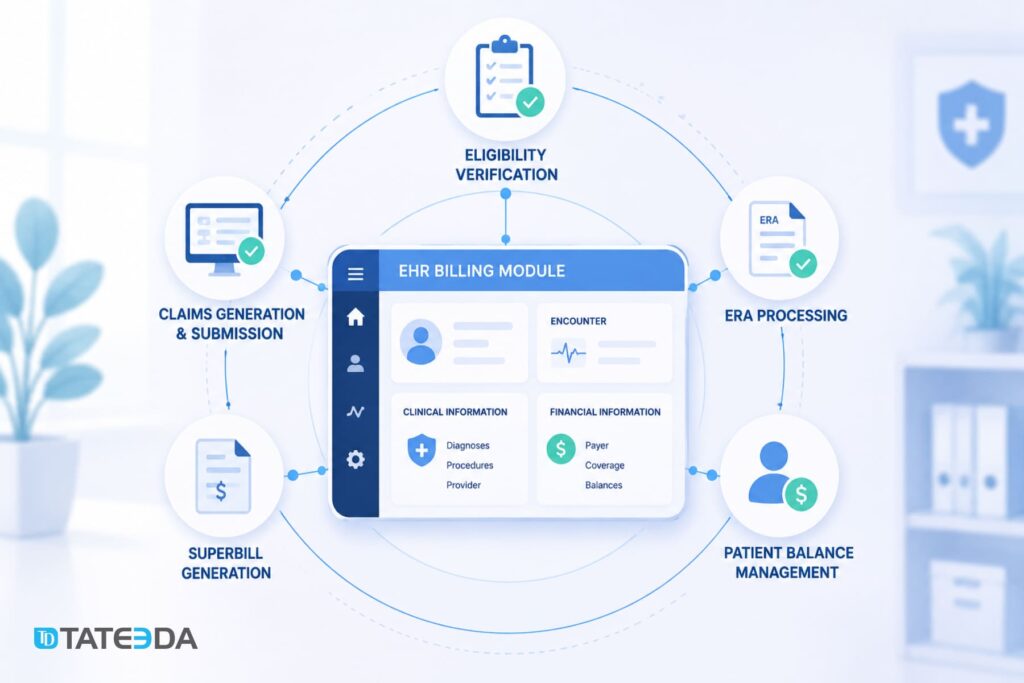
Table of Contents
Why a custom EHR billing module can outperform standalone billing software
Integration vs. interface: what changes when billing lives inside the EHR
When a practice uses an EHR and a standalone billing platform, data moves through an interface. The EHR exports encounter data. The billing system imports it. A biller or interface analyst resolves whatever did not map cleanly.
Every field mapping is a possible failure point. Every export cycle adds delay. Every mismatch creates a human review task.
When billing is built as a module inside the EHR, the data model can be shared. The encounter that a clinician documents becomes the same record the billing engine reads to create the superbill. The diagnosis codes attached to the encounter become the ICD-10 codes that support claim generation. The rendering provider’s National Provider Identifier (NPI), payer profile, place of service, and patient demographics can all come from the same source record.
There is less to export. Less to reconcile. Less to guess.
This does not mean every practice should build custom billing software. But for organizations with unusual workflows, high claim volume, specialty billing rules, or value-based reimbursement logic, a custom billing module can remove many fragile handoffs between clinical documentation and revenue-cycle operations.
The cost of fragmented revenue-cycle workflows
Imagine a 12-physician multi-specialty practice that uses one EHR for clinical documentation and a separate revenue-cycle platform for claims. At first, the setup looks manageable. A nightly interface sends encounters from the EHR into the billing system, and the billing team works from that imported data.
Then a problem appears. Some procedure modifiers are not passing cleanly through the interface. Claims still go out, but certain service lines are missing the data needed for accurate payer adjudication. The issue does not stop the workflow; it quietly degrades it.
By the time the team identifies the mapping problem, hundreds or thousands of claims may already need correction, resubmission, or appeal. The practice pays twice: first in delayed reimbursement, then in staff hours spent on avoidable denial work.
An integrated billing module does not remove every revenue-cycle risk. Payer rules still change. Documentation still matters. Coding still needs review. But it can reduce the interface layer where many avoidable defects begin.
Module 1 of 5: Eligibility verification
The X12 270/271 transaction: how eligibility checks work technically
Insurance eligibility verification commonly relies on two EDI transactions: the X12 270 Health Care Eligibility/Benefit Inquiry and the X12 271 Health Care Eligibility/Benefit Response.
The 270 is the outbound request. It identifies the patient, subscriber, payer, provider, and requested benefit categories. The 271 is the structured response. It can return coverage status, plan details, benefit information, co-pay details, deductible information, and other payer-specific coverage data.
In a custom EHR billing module, eligibility should not be treated as a one-time front-desk task. It should be a workflow service that can be triggered at multiple points and stored in a structured form that the billing engine can reuse later.
Modern eligibility vendors and clearinghouse APIs can often return fast responses, but exact timing depends on payer latency, clearinghouse routing, API limits, and data quality in the request. A safer architecture assumes that some responses will be instant, some will be delayed, some will be incomplete, and some will require staff review.
When to run eligibility
One eligibility check at scheduling is rarely enough. Coverage can lapse. Benefits can change. Deductibles can reset. Secondary insurance can appear after the first check. Coordination-of-benefits status can be unclear.
A practical billing module can run eligibility at several touchpoints:
- Scheduling: confirm active coverage, capture plan identifiers, and identify obvious eligibility issues before the visit is confirmed.
- Pre-check, usually 24 to 48 hours before the visit: re-check coverage because plan status may have changed between booking and appointment date.
- Check-in: confirm coverage at the point of service and capture more current deductible or co-pay details where available.
- Post-visit review for selected cases: handle complex coordination-of-benefits, high-deductible, or payer-specific cases before statements or secondary claims are generated.
The goal is not to spam payers with redundant requests. The goal is to trigger checks at points where new information can prevent a downstream billing problem.
Payer API vs. clearinghouse vs. direct EDI
Eligibility queries can follow several integration paths.
- Clearinghouse-routed EDI is the most common pattern. The EHR billing module sends X12 270 transactions to a clearinghouse or eligibility vendor, which routes them to the payer and returns the 271 response. This provides the product with a single integration path to a broader payer network.
- Direct payer APIs may be available for selected payers and selected administrative workflows. Some large payers expose provider-facing APIs, but availability, data richness, authentication, and contract requirements differ. A direct connection may return useful payer-specific data, but it creates more separate integrations to maintain.
- A hybrid routing model can be useful for larger practices. High-volume payers can be routed via direct or preferred API paths where available, while the rest are routed via clearinghouse EDI. This can reduce dependency on a single channel, but it also increases routing logic, monitoring, and support work.
Before choosing the model, the team should map payer mix, claim volume, contract requirements, existing clearinghouse relationships, API availability, fallback paths, and support ownership.

Handling eligibility failures and partial coverage responses
Eligibility failures should trigger a workflow, not just an error log. A good module classifies eligibility outcomes into actionable states:
- Confirmed active: coverage appears active for the requested service category.
- Inactive or terminated: coverage is not active, and the front desk or billing team needs follow-up.
- Pending or unclear: the payer returned an incomplete or ambiguous response.
- Partial coverage or benefit limitation: coverage exists, but benefit limitations, authorization rules, plan exclusions, or coordination-of-benefits issues may apply.
Each state should route to a different queue. One case may require a patient call. Another may require prior authorization review. Another may allow the visit to proceed but warn the billing team before claim generation.
An unclassified failure that disappears into a generic “error” bucket often becomes a denied claim later.
Module 2 of 5: Claims generation and submission
From encounter to 837: the data pipeline
Claim generation begins after the encounter is clinically ready for billing. The billing module reads the encounter record and assembles the data needed for an X12 837 claim.
A typical claim build may use:
- Billing provider NPI and Tax Identification Number (TIN)
- Rendering provider NPI, if different from the billing provider
- Facility NPI, where facility billing applies
- Patient and subscriber demographics
- Eligibility record and payer identifiers
- ICD-10 diagnosis codes from clinical documentation
- CPT and HCPCS procedure codes from the superbill or charge-capture module
- Date of service, place of service, and units
- Modifiers, where needed
- Referring provider NPI, where applicable
- Authorization or referral numbers, where required.
The module then constructs the 837 transaction, validates the claim, applies payer-specific edits where available, and routes the file or API payload through the selected clearinghouse or payer connection.
837P vs. 837I vs. 837D
The 837 standard has different implementation patterns for different claim types.
| Format | Common use case | Typical service-line segment |
|---|---|---|
| 837P | Professional claims: physicians, outpatient providers, ancillary services | SV1 |
| 837I | Institutional claims: hospitals, facilities, SNFs, home health, and related settings | SV2 |
| 837D | Dental claims | SV3 |
A custom billing module should not rely on one static claim-format setting for all encounters. The correct format can depend on provider taxonomy, place of service, facility context, organization type, payer requirements, and service category.
The safest design treats claim format selection as a rules-driven decision. Rules can be configured and reviewed by billing leadership rather than hard-coded deep inside the claim generator.
Claim scrubbing and validation
Claim validation should happen before submission. It should check the claim from several angles:
- L1: Transaction structure: correct file envelope, segment format, delimiters, and syntax.
- L2: Required data: mandatory fields are present for the claim type and payer.
- L3: Balancing: totals match service-line calculations.
- L4: Situational data: conditional fields appear when required by the claim context.
- L5: Code sets: ICD-10, CPT, HCPCS, modifiers, place-of-service codes, and other code sets are valid for the date and context.
- L6: Claim logic: diagnosis-procedure compatibility, modifier use, duplicate service checks, authorization flags, and payer-specific edits.
- L7: Payer companion guide rules: payer-specific rules that may go beyond base X12 validation.
SNIP-style validation is commonly used to describe layers of EDI and claim checks, but the exact validation path depends on the clearinghouse, payer, and claim category. For product design, the important point is simple: a claim that looks complete in the user interface may still fail because of transaction syntax, missing situational data, invalid code combinations, or payer-specific edits.
Clearinghouse integration: Availity, Waystar, and Change Healthcare / Optum
Clearinghouse choice affects payer reach, support burden, claim status visibility, ERA handling, and failover planning.
| Availity is a major healthcare information network and clearinghouse option used by many provider organizations. It may be relevant for practices with payer mixes that include large commercial and regional payers. Exact API capabilities, payer coverage, and implementation terms should be confirmed during vendor discovery. |
| Waystar is a major RCM and clearinghouse vendor with claim, remittance, eligibility, and payment-related capabilities. API access, payer coverage, and EHR connectivity depend on the product tier, contract, and implementation model. |
| Change Healthcare, now part of Optum, remains an important revenue-cycle infrastructure vendor. The February 2024 cyberattack made clearinghouse dependency and backup routing a board-level issue for many healthcare organizations. Any custom billing module should consider backup submission paths, downtime procedures, and manual exception workflows. |
A practical architecture can support primary and secondary clearinghouse routing. This does not mean every claim should be sent through multiple vendors. It means the system should know how to reroute selected claim traffic if the primary route is unavailable, contractually blocked, or operationally degraded.
TATEEDA’s custom software integration work can support clearinghouse onboarding, EDI mapping, claim-status workflows, and failover planning for custom healthcare billing systems.
Our SCRx pharmacy claim processing work involved prescription-order and claims-processing automation for a pharmaceutical distributor. That experience is relevant to billing workflow design because it required structured intake, claim-related automation, status tracking, and operational review around medication fulfillment.

Module 3 of 5: Superbill generation
What a superbill contains
The superbill sits between clinical documentation and claim generation. It is not the claim itself. It is the structured billing source that supports claim creation.
A complete superbill may include:
- One or more ICD-10 diagnosis codes
- Diagnosis pointers linking procedures to diagnoses
- CPT and HCPCS procedure codes
- Units and modifiers
- Date of service
- Place of service
- Rendering provider NPI and credentials
- Facility name and NPI, where applicable
- Line-item charges
- Internal billing status
- Coder review status, where required
Treating the superbill and the claim as the same object is a common architectural mistake. A superbill may not contain every field required for an 837 transaction. The claim generator still needs payer details, subscriber details, authorization information, billing-provider data, and EDI-specific structures.
Mapping clinical documentation to charge codes
In a well-designed custom EHR billing module, superbill creation can be partly automated through structured data and rules.
Structured documentation helps because the clinician selects diagnoses, procedures, or visit elements from controlled lists instead of relying only on free text. These selections can map to ICD-10, CPT, HCPCS, SNOMED CT, RxNorm, or internal billing concepts, depending on the workflow.
Charge-capture rules can associate visit types, procedures, templates, and documentation fields with candidate billing codes. For example, a completed wound-care note may suggest a procedure code for coder review. A structured injection workflow may populate drug and administration fields. A visit-complexity workflow may support evaluation and management coding review.
AI-assisted coding suggestions can also help, but they should be treated as recommendations for human review, not automatic billing decisions. Any claim-impacting suggestion should pass through an approved coding, compliance, or billing review process before submission.
Superbill as the bridge between EHR and billing
The superbill should be a versioned record, not a temporary object assembled on demand.
Once a clinician finalizes the encounter, the superbill can be created with a clear status: draft, ready for coding review, finalized, billed, corrected, or voided. If a coder changes a modifier, updates a diagnosis pointer, or corrects a unit count, the system should preserve the prior version and create a new one.
This pattern supports traceability. Billing teams can see what changed, who changed it, and why. Compliance teams can review the billing path without reconstructing it from scattered database fields.
Versioned superbills also support integrity controls. They do not by themselves satisfy every HIPAA requirement, but they help create a defensible record of billing-side changes tied to protected health information.
Superbill access through the patient portal
Some organizations may choose to expose itemized service-charge information through a patient portal. This can help patients understand what services were recorded, but it must be presented carefully.
A superbill is not the same as a final patient bill. It may show charges before payer adjudication, contractual adjustments, secondary insurance, deductible application, or patient-responsibility calculation.
If a practice exposes superbill-like information to patients, the system should support:
- Role-based access confirming the viewer is the patient or an authorized representative
- Audit logging for every access event
- Plain-language explanation of what the superbill means
- Clear distinction between submitted charges and actual patient responsibility
- Secure portal delivery rather than unprotected email attachments

Module 4 of 5: ERA processing and denial management
The X12 835 file: structure and auto-posting logic
When a payer processes a claim and issues payment or adjustment information, it can send an X12 835 Health Care Claim Payment/Advice transaction. The 835 is the provider-facing electronic remittance record.
The patient may separately receive an Explanation of Benefits (EOB) from the payer. The ERA and EOB relate to the same adjudication decision, but they serve different audiences and channels.
The 835 may include:
- Payment amounts at the claim and service-line level
- Allowed amounts
- Contractual adjustments
- Claim Adjustment Reason Codes (CARCs)
- Remittance Advice Remark Codes (RARCs)
- Claim Adjustment Group Codes such as CO, PR, OA, and PI
- Patient responsibility amounts
- Denial or underpayment information
Auto-posting logic reads the 835, matches it to the original claim by payer claim number, internal claim ID, service date, patient, and service lines, then posts payment, adjustments, and patient responsibility to the ledger.
For a cleanly adjudicated claim, this may require little or no human intervention. For partial payments, mismatched lines, denials, or unexpected adjustments, the module should route the record into a review queue.
Contractual adjustments vs. denial routing
The 835 contains different kinds of non-payment and adjustment information. A good billing module does not treat all adjustments as denials.
Contractual adjustments are expected reductions based on payer contracts or allowed amounts. These may be posted as write-offs according to payer contract logic.
Patient responsibility amounts indicate what the patient may owe after payer adjudication. These can include co-pay, coinsurance, deductible, or non-covered services, depending on the payer decision and group code context.
Denials and rejection-like outcomes require review. These may involve missing authorization, diagnosis-procedure mismatch, invalid modifier, timely filing, duplicate claim concerns, coverage issues, or payer-specific rules.
CARC, RARC, and group codes should be evaluated together. For example, CO is a group code, not a denial reason by itself. PR indicates patient responsibility, not automatically a billing error. A safe denial-routing engine reads the full remittance context before assigning the work item.
Denial queues can route work by cause:
- Authorization queue for missing or invalid authorization issues
- Coding queue for modifier, procedure, or diagnosis-code review
- Eligibility queue for coverage-related issues
- Duplicate-review queue for potential duplicate services
- Appeal queue for denials that need supporting documentation.
Without this mapping, billers spend too much time triaging and too little time resolving.
Building appeal workflow into the EHR billing module
An appeal workflow inside the EHR billing module can connect the denial reason to the clinical documentation needed to support the appeal.
When a denial routes to coding review, the coder should be able to see the original encounter note, superbill version, claim submission record, payer response, CARC/RARC details, and any related authorization data in one workspace.
If the claim needs correction, the system should generate a corrected claim from the existing record. It should not require the biller to rebuild the claim manually from disconnected data.
Appeal tracking can include:
- Appeal status
- Assigned owner
- Due date
- Payer contact history
- Submitted documents
- Resubmission record
- Final resolution
- Amount recovered.
TATEEDA can support appeal-tracking workflows that link denied claims to appeal status, escalation history, and resolution data inside custom healthcare billing software.

ERA vs. EOB: what developers need to know
Developers should keep ERA and EOB concepts separate.
The ERA is the provider-facing electronic remittance transaction, often represented by X12 835.
The EOB is the patient-facing explanation from the payer.
Your billing module processes the ERA. Your patient billing or communication module may create a patient statement using patient-responsibility amounts derived from the ERA. Meanwhile, the payer may send an EOB directly to the patient.
The numbers should align. If the EOB says the patient owes one amount and the provider statement shows another, the patient will call. Often, the cause is not patient confusion. It is faulty ERA parsing, secondary insurance timing, adjustment posting, or patient-responsibility calculation.
Module 5 of 5: Patient balance management
Calculating patient responsibility
After ERA posting, the billing module calculates the patient’s remaining responsibility. This can include:
- Co-pay: a fixed amount due at or after the visit
- Co-insurance: a percentage of the allowed amount
- Deductible: the amount applied to the patient’s plan deductible
- Non-covered services: services excluded by the plan or not payable under the patient’s coverage
- Secondary-insurance adjustments: remaining balance after coordination of benefits.
These components should be tracked separately, not collapsed too early into one balance field. Each component may have different collection rules, patient explanations, write-off policies, and payment-plan eligibility.
Statement generation logic and billing-cycle rules
A patient statement should not automatically go out the moment an ERA posts. The timing depends on the practice’s billing policy, secondary insurance status, balance threshold, payer rules, and patient communication preferences.
A configurable billing-cycle engine can define:
- Hold period after ERA posting before statement generation
- Secondary claim routing and statement hold until secondary ERA arrives
- Minimum statement threshold
- Payment-plan eligibility threshold
- Suppression rules for disputed balances
- Statement frequency
- Portal vs. print delivery preference
- Language preference
- Escalation rules for overdue balances
The statement should explain why the patient owes the amount. A ledger number without context creates calls, disputes, and slower payments.
Patient portal integration for online payment collection
TATEEDA has built a custom HIPAA, NACHA, and PCI-DSS-aware patient billing and payment portal for a confidential healthcare client, documented in our custom patient payment portal case study. For healthcare organizations building this layer from scratch, patient portal development may include secure login, patient ledger display, payment plans, card or ACH payment workflows, and transaction audit logs.
Key requirements for patient payment integration include:
- PCI-DSS-aware payment flow: card data should not pass through the EHR environment if a tokenized payment gateway can handle it.
- ACH and NACHA requirements: eCheck workflows need proper authorization language, authorization records, and return-handling logic.
- Current balance display: the portal should read the current patient ledger through an API, not rely only on a nightly copy.
- HIPAA-aware records: payment confirmation records can be linked to healthcare services and should be protected as sensitive healthcare information.
- Audit logging: access, payment actions, failed attempts, plan changes, and refunds should be recorded.
Payment plans and partial payment reconciliation
When a patient’s balance exceeds a practice-defined threshold, the billing module can offer a payment plan. Common thresholds vary by organization, patient population, and financial policy.
A payment-plan engine may include:
- Installment calculation
- Stored payment method tokens
- Payment schedule
- Missed-payment handling
- Partial payment posting
- Plan renegotiation
- Automatic balance recalculation
- Staff override permissions
- Patient notification rules.
The allocation method should be configurable. Some organizations use first-in, first-out allocation. Others need service-line-specific allocation. Auditors and billing teams should be able to reconstruct exactly which charges were paid, when payment occurred, and how the remaining balance was calculated.
HIPAA-aware architecture for EHR billing modules
PHI scope in billing workflows
Billing data is PHI-dense. It links patient identity to diagnosis codes, procedure codes, dates of service, provider names, insurance details, payment amounts, and sometimes sensitive service categories.
Under HIPAA’s minimum necessary standard, access should be limited by role and job function. Billers, coders, practice administrators, clinicians, and support staff do not all need the same permissions.
PHI fields in a billing module may include:
- Patient name
- Date of birth
- Member ID
- Subscriber information
- Diagnosis codes
- Procedure codes
- Dates of service
- Provider names
- Insurance plan details
- Payment amounts
- Authorization numbers
- Claim notes
- Denial notes
Access to these fields should be controlled, logged, and reviewed.
Encryption, role-based access, and audit logging
HIPAA’s Security Rule requires covered entities and business associates to implement technical safeguards for systems that contain electronic protected health information. The exact security design should be based on the organization’s risk analysis, legal obligations, payer contracts, and operating model.
A practical EHR billing module should include:
- Role-based access control limiting billing records to authorized users
- Session timeout and re-authentication for sensitive workflows
- Audit logs showing who accessed, created, changed, or deleted billing records
- Integrity controls that help detect unauthorized alteration
- Encrypted data exchange with clearinghouses, payers, and payment vendors
- Encryption at rest and in transit according to the organization’s security policy
- Administrative controls for user provisioning and offboarding
- Vendor access controls for support and implementation teams.
TLS 1.2 or higher and AES-256 are common implementation choices, but the final control set should follow the client’s risk analysis and compliance policy rather than a generic checklist.
Audit retention should also be defined carefully. HIPAA documentation requirements, state law, payer contracts, and internal record-retention policy may all matter. Avoid designing the system around a single retention number without legal and compliance review.
BAA requirements for clearinghouses and payment processors
A clearinghouse, payment processor, ERA vendor, eligibility vendor, or billing-support vendor may be a business associate when it creates, receives, maintains, or transmits PHI on behalf of a covered entity or another business associate.
Before routing PHI through a vendor, the organization should confirm whether a Business Associate Agreement (BAA) is required and whether the vendor’s service is covered by that agreement.
The clearinghouse’s BAA does not automatically cover how your EHR stores, displays, audits, or transforms billing data. Your system still needs its own HIPAA-aware access controls, audit controls, data protection, and operational policies.
TATEEDA can work under appropriate BAA, confidentiality, and security arrangements when required by the engagement. Our HIPAA-aware healthcare software development work starts with data-flow mapping, role design, PHI boundaries, vendor review, and security requirements before feature implementation begins.
Technology stack and integration considerations
Backend choices for EHR billing modules
Several backend stacks can work for EHR billing modules. The right choice depends on the existing product architecture, hosting environment, team experience, payer integration requirements, and volume.
.NET (C#) is a common choice for enterprise healthcare systems, especially in Microsoft and Azure environments. It works well for API development, background services, rules engines, and structured billing workflows.
Java is common in enterprise healthcare integration layers, hospital-grade systems, and high-volume transaction processing environments. It can be a strong fit for complex rules engines and large-scale EDI processing.
Node.js can be useful for API layers, patient portal backends, event-driven workflows, and payment-status interfaces. It is often used alongside other backend services rather than as the only billing engine.
Integration platforms and EDI tools may include EDI libraries, managed EDI services, BizTalk Server, custom parsers, clearinghouse SDKs, or cloud-native workflow services. BizTalk is better described as an integration platform, while specialized EDI libraries handle parsing and transaction construction more directly.
API-first design and database patterns
A custom billing module should expose internal capabilities through well-documented APIs. These services should not be hidden inside tightly coupled internal functions that only one application screen can use.
Relevant API domains may include:
- Eligibility checks
- Coverage records
- Superbill records
- Claim creation
- Claim status
- ERA posting
- Denial queues
- Patient ledger
- Payment plans
- Statement generation
- Portal payment workflow.
FHIR R4 includes financial and administrative resources such as Claim, ClaimResponse, ExplanationOfBenefit, Coverage, and CoverageEligibilityRequest. These resources can inform the API model, but payer-specific and CMS-rule-specific requirements should be mapped separately.
A claim’s lifecycle should be modeled as a state machine. Possible states may include created, reviewed, scrubbed, submitted, acknowledged, paid, partially paid, denied, appealed, corrected, adjusted, written off, or voided.
A claim_status column can store the current state, while a claim_status_history table records every transition with timestamp, user, system trigger, and reason.
Patient account balances should use a ledger pattern. Every financial event should be recorded as a debit or credit entry. The current balance should be derived from ledger entries rather than stored as a mutable number that can drift after concurrent updates, refunds, reversals, or partial payments.
Build, extend, or integrate?
When building a custom billing module makes sense
A custom billing module may make sense when:
- The EHR serves a specialty or workflow that commercial billing platforms do not handle well.
- The organization needs tight integration between clinical documentation and charge generation.
- The payer mix includes direct contracts, Medicaid complexity, capitation, or value-based reimbursement logic.
- The organization has enough claim volume to justify long-term product ownership.
- The existing product needs billing as part of a broader healthcare platform rather than a separate RCM tool.
- The team needs control over patient balance logic, payment plans, specialty education, or portal workflows.
Custom billing is not the easiest path. It requires ongoing code-set updates, payer-rule maintenance, testing, security review, clearinghouse management, and billing-operations support. But for the right product, it can create cleaner workflow control than a disconnected billing platform.
When integrating a third-party RCM platform is better
For many practices, integrating a mature RCM platform is the more practical choice. Vendors such as Waystar, Tebra/Kareo, and AdvancedMD may offer API or integration options depending on product tier and contract.
This approach can give the organization access to existing payer relationships, clearinghouse connectivity, edit libraries, ERA workflows, and billing operations features without building every component from scratch.
The tradeoff is control. A third-party RCM platform may not support every custom rule, specialty workflow, patient portal requirement, or reimbursement model. The architecture decision should compare total cost, time-to-launch, vendor dependency, workflow fit, data access, and maintenance responsibility.
How TATEEDA approaches modular EHR billing development
In a typical phased implementation, TATEEDA starts by reviewing the existing clinical data model, encounter structure, payer workflows, and revenue-cycle gaps. The first architectural question is whether the organization needs a full billing build, a modular extension, or an integration with an existing RCM platform.
For a behavioral health EHR, for example, the clinical documentation layer may already be stable. The missing piece may be a billing module that shares the patient and encounter data model but keeps clinical and financial permissions clearly separated.
A phased build might start with eligibility verification, then move into superbill generation, claim creation, clearinghouse submission, ERA posting, denial queues, and patient balance workflows. Each module can be delivered and tested before the next one is added.
This kind of modular delivery reduces risk. The team does not have to replace the whole EHR. It can add billing capabilities where they are needed, connect them through clear APIs, and preserve clinical workflows that already work.
TATEEDA’s healthcare IT consulting team can help product teams decide whether to build, extend, or integrate. Our custom EHR software development work covers architecture assessment, billing-module planning, EDI and API integration, patient portal workflows, payment features, HIPAA-aware engineering, and long-term product support.
Conclusion
A custom EHR billing module is not just a claim-submission feature. It is a connected revenue-cycle workflow that starts with eligibility, moves through clinical documentation and superbill generation, creates the right claim format, processes remittance, and calculates the patient’s final responsibility.
The strongest architecture uses shared clinical and billing data, clear state transitions, versioned records, claim validation, denial routing, ledger-based patient balances, vendor-aware clearinghouse integration, and HIPAA-aware access controls.
For some practices, a third-party RCM platform will be the better path. For others, especially specialty practices, healthtech platforms, high-volume organizations, and teams with custom reimbursement logic, a custom billing module can reduce fragile handoffs and give the business more control over revenue-cycle workflows.
TATEEDA builds custom healthcare software for U.S. healthcare organizations and digital health companies that need billing workflows that their standard EHR or RCM vendor cannot fully support. We can help assess your existing architecture, map the billing data model, design the integration plan, and build the modules needed to connect clinical documentation, claims, ERA, patient balances, and portal payments.
Talk to a solution architect about your EHR billing module, or start with a cost estimate to understand what a custom build may involve.




![8 Medical Billing Automation Developers in California [2026]](https://tateeda.com/wp-content/uploads/2026/10/Cover.png)
