EHR Clinical Documentation Workflow Automation: From Note Signing to Patient Delivery

Slava Khristich



Vlad Nazarov
In this article, you’ll learn how EHR clinical documentation workflow automation turns a signed note into patient-ready communication. It covers note signing detection, AI-generated patient summaries, education routing, HIPAA-compliant portal delivery, FHIR R4 resources, clinician approval, and custom EHR integration across Epic, Oracle Health, and athenahealth environments.
EHR clinical documentation workflow automation is the process of triggering a chain of patient-facing actions the moment a clinician finalizes and signs an encounter note: generating a plain-language visit summary, routing condition-matched education materials, and delivering everything to the patient portal via a Health Insurance Portability and Accountability Act (HIPAA)-compliant message. When built correctly on FHIR R4 and supported by the target EHR environment, the chain can execute within minutes of chart signing, with manual work limited to approval, exception handling, or clinical review.
Many teams automate only one part of the chain, often documentation capture, while downstream patient communication still depends on manual staff work. They automate one piece, usually ambient documentation, and leave the rest to staff workflows that require three to five manual steps per patient. This article walks through each link in the chain: how to detect the note-finalization event across Epic, Oracle Health, and athenahealth; how to generate a patient-readable summary from a signed clinical note; how to route condition-specific education content using FHIR resources; and how to deliver everything to the patient portal under HIPAA’s minimum-necessary standard. Where the chain differs across EHR platforms, this guide shows you the specific differences.
Key Takeaways
- The EHR clinical documentation automation chain has four discrete steps: note signing detection, AI summary generation, education material routing, and HIPAA-compliant portal delivery, each with distinct FHIR resources and compliance requirements.
- Epic, Oracle Health, and athenahealth expose encounter, documentation, and workflow events through different API and interface models. During discovery, the integration team must confirm which event best represents final note approval or encounter closure in the client’s exact EHR environment.
- AI-generated patient-facing summaries should pass through clinician approval before portal delivery, especially when they include medications, diagnosis explanations, or care-plan instructions. Architect this as a
Taskresource gate,status: requesteduntil the clinician approves, with a timeout and escalation path. - Portal-delivered after-visit summaries achieve a 67% patient open rate versus 31% for printed paper handouts, according to a peer-reviewed study on after-visit summary utilization via patient portals.
- The full chain can be built custom when native EHR configuration limits your requirements; common scenarios include multilingual summaries, specialty-specific education libraries, and multi-portal delivery across mixed EHR environments.
Table of Contents
The Four Steps That Close the Clinical Encounter Loop
Every encounter in an electronic health record (EHR) generates information that patients need: what happened during the visit, what they should do next, and what they should watch for. In most ambulatory and acute care settings, delivering that information depends on a paper handout printed at checkout, a generic portal message sent by a medical assistant, or nothing at all.
The problem is not that EHRs lack post-visit functionality. Epic, Oracle Health, and athenahealth all include after-visit summary (AVS) tools. The problem is that these tools are configured, not programmable. They produce standardized outputs from a fixed template. They cannot generate a plain-language summary from an ambient documentation transcript. They cannot route a patient to a specific education module based on the ICD-10 codes attached to the closed encounter. They cannot deliver a Spanish-language summary with a custom logo to a specialty clinic’s branded patient app.
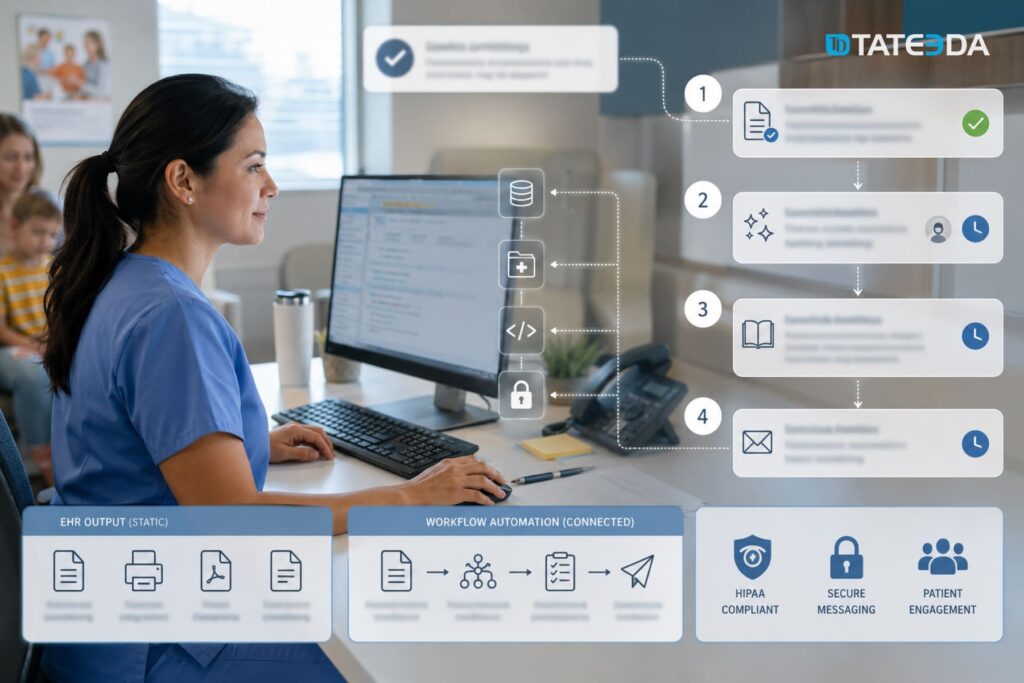
Custom EHR clinical documentation workflow automation solves this by treating the chart-signing event as a system trigger rather than a manual step. The chain runs in four steps:
- Signing event detection : the system detects that a clinician has finalized the note and closed the encounter
- AI summary generation : a language model converts the clinical note into a patient-readable visit summary, pending clinician approval
- Education routing : the system matches the closed encounter’s diagnoses and procedure codes to condition-specific education materials
- Portal message delivery : the summary and education links are packaged into a HIPAA-compliant
CommunicationRequestand delivered to the patient portal
Each step requires a separate engineering decision. The FHIR resources differ at each step. The HIPAA requirements differ at each step. And the mechanism for triggering each step differs across the dominant EHR platforms.
Imagine a nine-provider pediatric practice that still handles post-visit communication manually. After a well-child visit, a medical assistant opens the chart, sends a generic portal message, attaches a standard education PDF, and hopes the family reads it. The process technically works, but it depends on staff memory, available time, and content that may not match the child’s age, diagnosis, language preference, or care plan.
Now imagine the same practice after implementing a signing-triggered automation pipeline. Once the clinician finalizes the note, the system generates a plain-language visit summary, routes age- and condition-appropriate education materials, and sends everything through the patient portal or another approved delivery channel. Families receive clearer instructions sooner, while staff move from repetitive sending tasks to exception review: checking failed deliveries, unanswered messages, or cases that need clinical follow-up.
The lesson is simple. The value does not come solely from the after-visit summary. It comes from integrating note signing, summary generation, education routing, and patient delivery into a single controlled workflow.
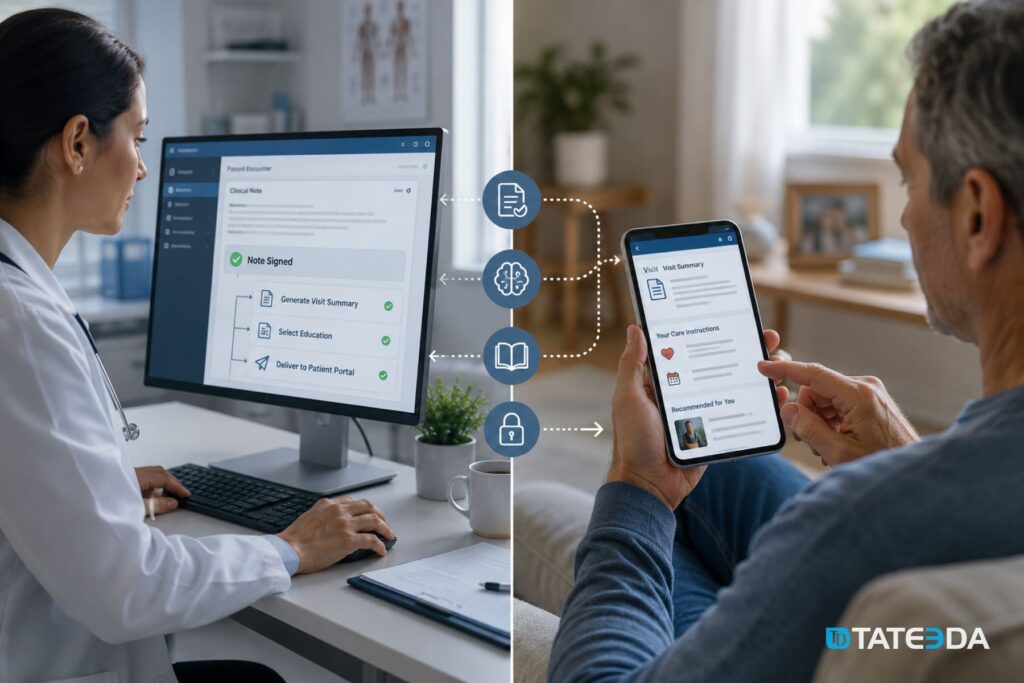
Step 1. Detecting the Note-Finalization Event
What does “chart signing” mean in EHR architecture?
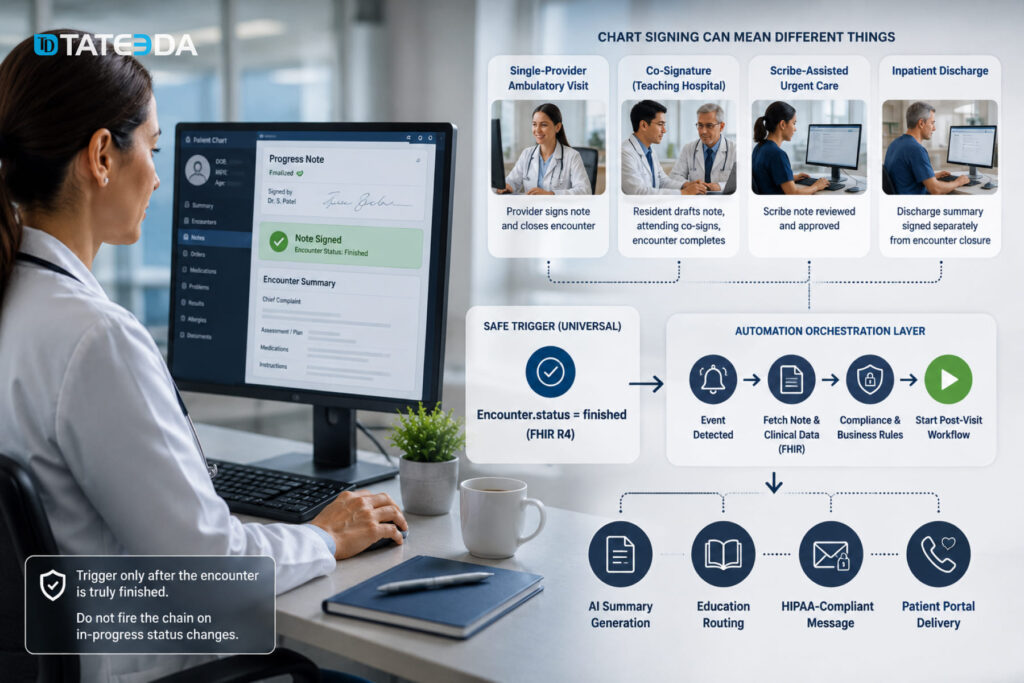
The phrase “chart signing” describes at least four distinct clinical events depending on the EHR and the care setting. In a single-provider ambulatory practice, the physician signs the note, and the encounter is simultaneously closed. In a teaching hospital, a resident drafts the note, an attending co-signs it, and the encounter is not complete until both signatures are present. In some urgent care workflows, the chart is considered complete when a scribe-assisted note is reviewed and approved. In inpatient settings, a “discharge summary” signing is a separate event from the encounter closure.
Your automation trigger must account for the specific finalization event that applies to your use case. The safest universal signal in FHIR R4 is Encounter.status = finished , which is set only after all required clinical activities on the encounter are complete. See the FHIR R4 Encounter resource specification for the full status lifecycle and value set. Do not trigger automation on in-progress encounter status changes; you will fire the chain before the note is ready.
Epic: CDS Hooks and SMART on FHIR triggers
Epic exposes the note-finalization event through two mechanisms. The primary option for custom workflows is CDS Hooks, specifically the encounter-discharge hook, which fires when a clinician completes the encounter closure workflow in Epic’s interface. This hook delivers a prefetch bundle that includes the Encounter resource, the patient’s active Condition list, and recent DocumentReference resources.
A second option is Epic’s SMART on FHIR application framework combined with the note-complete event in Epic’s proprietary webhook system, available through the App Orchard developer program. This approach requires a separate App Orchard application registration and is appropriate when your automation pipeline needs access to the full clinical note text, not just encounter metadata.
athenahealth: Changed Data Subscriptions and webhook events
athenahealth’s integration model is fundamentally event-based through its Changed Data Subscriptions (CDS) API, which is distinct from the FHIR CDS Hooks standard. The relevant subscription events for note finalization are CLINICALNOTE. SIGNED and ENCOUNTEROTHER. CLOSED . The first fires when a provider signs a clinical note in athenahealth’s chart. The second fires when the encounter record is closed in athenahealth’s backend.
For the automation chain, subscribe to both events and use the CLINICALNOTE. SIGNED event as the primary trigger. This event payload includes the note ID, encounter ID, and provider ID. Use these to fetch the complete note content via athenahealth’s clinical documentation API endpoint before starting the AI summarization step.
Oracle Health: FHIR Subscriptions and ADT feeds
Oracle Health (formerly Cerner) supports FHIR R4 Subscription resources natively, which makes trigger detection more straightforward for teams already working in FHIR. Create a Subscription with a criteria filter of Encounter?status=finished . Oracle Health’s FHIR server will push a notification to your registered endpoint whenever an Encounter transitions to finished status.
For legacy Oracle Health environments that have not yet migrated to FHIR R4, Health Level Seven (HL7) ADT A03 messages (patient discharge) serve as the trigger event. The ADT A03 message contains the encounter identifier, which you use to fetch the associated clinical note via Oracle Health’s FHIR DocumentReference API.
FHIR R4 Encounter lifecycle as a universal anchor
Regardless of EHR platform, structure your orchestration layer around Encounter.status transitions. The FHIR R4 Encounter resource defines a status lifecycle: planned , in-progress , finished , cancelled . Your trigger fires on the transition to finished . Your pipeline then fetches the associated DocumentReference resources with type.coding.code = 11506-3 (progress note) or 34111-5 (emergency department note), depending on care setting.
This abstraction layer is what allows a single workflow engine to operate across Epic, athenahealth, and Oracle Health environments. The platform-specific event listener translates the native signing event into a FHIR Encounter status update; everything downstream operates on FHIR resources.
Step 2. AI-Generated Patient Summary
From SOAP note to plain-language patient output
The signed clinical note arriving in your pipeline is a SOAP (Subjective, Objective, Assessment, Plan) document written for clinical readers at a professional reading level. A primary care progress note routinely contains International Classification of Diseases (ICD)-10 codes, medication names with dosages, lab reference ranges, and clinical shorthand. A patient receiving this verbatim would face the same comprehension problem as reading a radiology report without a radiologist’s interpretation.
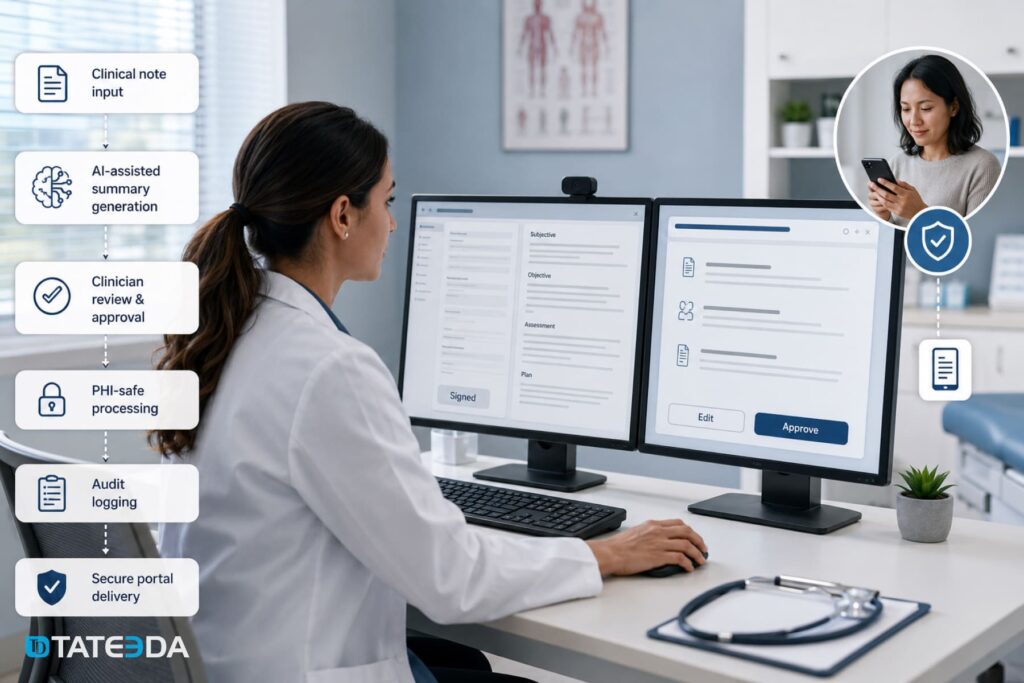
The AI summarization step takes the DocumentReference content as input and produces a 200-300 word plain-language summary targeted at a Flesch-Kincaid grade 6 to 8 reading level. The output should include: what was discussed during the visit, what diagnoses or conditions were addressed, what the care plan requires of the patient (medications, follow-up appointments, lifestyle changes), and what symptoms warrant urgent contact.
Prompt engineering for this step must explicitly constrain the model. The prompt should instruct the model not to include laboratory reference values without patient-appropriate context, not to include differential diagnoses that were ruled out, and not to use clinical abbreviations without spelling them out. Test your prompts against notes from multiple specialty types before production deployment.
PHI safety in the AI summarization step
Protected Health Information (PHI) cannot leave a HIPAA-covered environment. The AI model used for clinical summarization must either run on infrastructure covered by a signed Business Associate Agreement (BAA) with the AI vendor, or it must run within your own infrastructure boundary.
OpenAI’s enterprise API tier, Microsoft Azure OpenAI Service, and AWS Bedrock all offer BAAs for appropriate healthcare use cases. On-premises model deployment using open-weight models such as Llama 3 or Mistral provides an alternative where data sovereignty requirements prohibit third-party processing.
All model inputs, outputs, model version identifiers, and timestamps must be logged to an audit trail with a six-year retention period per the HIPAA Security Rule. This is not optional. If a patient disputes the accuracy of a portal-delivered summary, the audit trail is your evidence of what the model received, what it produced, and who reviewed it.
The clinician approval gate
This is the step most engineering teams skip, and the omission creates legal exposure. An AI-generated patient-facing document is a clinical communication. Sending an unreviewed AI output to a patient portal puts the signing clinician’s name on content they have not approved. In cases involving medication changes, diagnostic interpretations, or care plan instructions, this is a patient safety issue, not just a compliance one.
Architect the approval gate as a FHIR Task resource. When the AI summary is generated, create a Task with status: requested , owner set to the signing clinician’s Practitioner resource ID, and input referencing the generated summary. The clinician receives an inbox notification in the EHR (or via a custom dashboard) and reviews the summary. Approval sets Task.status = completed and releases the summary to the next pipeline step. Rejection sets Task.status = rejected and triggers an alert for manual handling.
Set a timeout on the Task . If the clinician has not approved within four hours of signing, escalate to a designated reviewer (charge nurse, medical assistant supervisor, or practice manager, depending on your workflow). Do not let the chain stall indefinitely; the patient’s care depends on timely delivery.
Ambient documentation as an upstream input
If your organization uses an ambient documentation platform, Nuance DAX Copilot, Abridge, or Suki, the AI summarization step in your pipeline has a different input source. These platforms already produce a structured clinical note from the encounter conversation. Your summarization step receives this structured note rather than a dictated or manually typed SOAP document.
This changes the prompt design. Ambient scribe outputs are typically more structured and consistent than physician-typed notes, which means the summarization model can rely on predictable sections and reduce hallucination risk. Confirm with your ambient documentation vendor how their structured output maps to DocumentReference before designing the prompt pipeline.
Step 3. Condition-Specific Patient Education Routing
Matching the encounter to education content
Not every patient leaving a primary care visit has the same information needs. A patient diagnosed with Type 2 diabetes for the first time needs different education content than a patient with a 10-year diabetes management history returning for a routine A1C check. Sending a generic “managing your diabetes” brochure to both is the current state of most EHR post-visit workflows. It is also why most patients do not read the materials they receive.
Condition-specific routing reads the ICD-10 and SNOMED codes attached to the closed Encounter resource, specifically the Encounter.diagnosis array. Each diagnosis entry references a Condition resource with a code element. Your routing engine maps these codes to an education content library, selecting materials appropriate to:
- The specific condition or procedure performed
- The patient’s care stage (newly diagnosed, managing a chronic condition, post-procedure recovery)
- The patient’s preferred language, drawn from
Patient.communication - The health literacy tier specified in the patient’s demographic record, if your organization captures this
If no condition-specific content exists for a given ICD-10 code, fall back to a general post-visit instructions document rather than sending nothing. The fallback should include appointment follow-up instructions and contact information for the care team.
Education content libraries and FHIR delivery
FHIR R4 represents patient education documents as DocumentReference resources with type.coding.code = 11488-4 (consult note and patient education) or as Communication payloads referencing external document URLs. See the FHIR R4 DocumentReference specification for the full resource definition and type code value set. Your content library can be managed as a collection of DocumentReference resources stored in a FHIR server or as a structured database with FHIR-compatible API access.
Two commercial options exist for practices that do not want to build or maintain a custom education library. WebMD Ignite’s IntegratED for EHR platform integrates via SMART on FHIR, delivering condition-matched education content directly into the EHR workflow. UpToDate Patient Education offers similar SMART on FHIR integration with evidence-based content reviewed by clinical editors. Both platforms require a separate licensing agreement but significantly reduce the content management burden.
For specialty practices with content requirements that commercial libraries do not meet, behavioral health, oncology, rare disease, custom library builds are common. TATEEDA has built custom education libraries for specialty practices that maintain condition-specific content under clinician authorship, versioned by ICD-10 code with approval workflows for content updates.
Language, literacy, and accessibility
Fifty-seven million people in the United States speak a language other than English at home. If your patient population includes non-English speakers and your education routing sends English-only content, your automation chain is not serving those patients.
The FHIR Patient resource includes a communication element that specifies the patient’s preferred language using a BCP-47 language tag (e.g., es for Spanish, zh for Chinese). Your routing engine should read this value and select content from the appropriate language variant of the matched education material. If the preferred-language variant does not exist, surface a flag to the clinical staff rather than silently delivering English content.
Accessibility requirements include screen reader compatibility for patients using assistive technology, high-contrast PDF versions for patients with visual impairments, and audio versions for patients with low literacy. These requirements vary by payer contract and state Medicaid program. Confirm the accessibility requirements specific to your patient population before scoping the content library build.
Step 4. Secure Portal Message Delivery
FHIR CommunicationRequest to Communication execution
The FHIR R4 CommunicationRequest resource represents the intent to deliver a message to a patient. Once the clinician has approved the AI summary and the education routing engine has selected content, create a CommunicationRequest with:
status: activecategory: patient education messagesubject: reference to the patient’sPatientresourcerecipient: the patient’s portal inbox (referenced via thePatient.identifierfor the portal account)payload: the approved visit summary text and URL references to the selected education documentsbasedOn: reference to the approvedTaskresource (creating an auditable link from approval to delivery)
When the portal delivery service executes the delivery, create a Communication resource with status: completed and basedOn referencing the originating CommunicationRequest . This FHIR resource pair creates the audit trail: the request was made, and the delivery occurred. If delivery fails, set Communication.status = failed and trigger the retry and escalation logic.
Platform-specific portal delivery
Each EHR platform uses a different API to write messages to the patient portal inbox.
Epic’s MyChart inbox is written via Epic’s SMART on FHIR application layer. A registered SMART app with patient/Communication.write scope can post a message to the patient’s MyChart inbox. The message appears as an inbox notification and links to attached documents.
athenahealth’s patient portal delivery uses the Communicator API ( POST /communicator/patient/{patientid}/message ) with the practice ID and portal credentials. athenahealth also supports PATIENTPORTAL. MESSAGE. SENT webhook events for delivery confirmation.
Oracle Health’s Patient Connect portal uses the FHIR Communication resource API with POST /Communication , provided the Oracle Health environment has Patient Engagement APIs enabled. Confirm with your Oracle Health implementation team whether Patient Engagement APIs are active in your specific environment.
For custom patient portal builds, the delivery endpoint is typically a REST API endpoint with JWT authentication, posting the message payload and triggering a push notification to the patient’s mobile device or an email notification to the patient’s registered address.
HIPAA compliance at the delivery layer
Three HIPAA requirements apply specifically at the portal delivery step.
Building the Orchestration Layer
Event-driven vs. polling architecture
The design choice between event-driven triggers and polling affects latency, infrastructure cost, and reliability. For post-visit automation, event-driven architecture is strongly preferred. Polling an EHR API every 60 seconds to check for newly finalized encounters incurs API rate limit risk, introduces up to 60 seconds of unnecessary latency, and wastes API quota on empty responses.
FHIR Subscription resources (for Oracle Health and FHIR R4-compliant systems) and native webhook subscriptions (for Epic and athenahealth) both deliver push notifications within seconds of the triggering event. Configure the endpoint to acknowledge webhook delivery within the vendor’s required timeout window, then process heavier downstream work asynchronously.
Your orchestration layer should function as a stateful workflow engine, not a series of independent microservices. Each step in the chain writes its state to a FHIR Task resource: task created when the signing event fires, task updated when AI summary is generated, task updated when clinician approves, task updated when education routing completes, task completed when portal delivery confirms. This state persistence means any step can be retried without reprocessing earlier steps.
Error handling and retry logic
Failures in the chain are predictable. The AI summarization service may be temporarily unavailable. The clinician may not respond to the approval request before the timeout. The education routing engine may find no matching content. The portal delivery API may return a 503 error.
Each failure type requires a different response:
- AI summarization failure : retry with exponential backoff up to three times; if all retries fail, set the
Taskto afailedstate and surface an alert to the clinical operations dashboard - Clinician approval timeout : escalate to the designated secondary reviewer; do not retry the approval request to the original clinician
- Education routing: no content match : fall back to the generic post-visit instructions document; do not block portal delivery
- Portal delivery failure : retry up to three times with exponential backoff; after three failures, queue the message for manual delivery by staff and surface an alert
Log every failure event to the FHIR AuditEvent resource with the outcome code set to 8 (serious failure) and the outcomeDesc field containing the error details. These audit events are the first place to look when investigating delivery gaps.
Observability and monitoring
A chain that runs silently is a chain that fails silently. Your automation pipeline needs a monitoring layer that surfaces anomalies before patients notice them.
Track three metrics at the pipeline level: average time from signing event to portal delivery (target: under 10 minutes for ambulatory visits), clinician approval rate (target: above 95%), and portal delivery success rate (target: 99.5% or above). Alert on deviations from these baselines rather than waiting for patient or staff complaints.
The FHIR AuditEvent resource is your operational log. Every step in the chain creates an AuditEvent with the actor (system or practitioner), the action taken, the resource affected, and the outcome. A dashboard querying AuditEvent by action = E (Execute) and outcome = 0 (Success) across the signing-to-delivery window gives you a real-time view of chain health.
What Custom EHR Development Enables That Configuration Doesn’t
Epic’s native AVS tooling generates a structured document from a fixed template. It includes the visit date, the provider name, the diagnosis list, the active medication list, and a generic “instructions” section populated from Epic’s education content library. It does not generate a plain-language narrative from an ambient scribe transcript. It does not produce summaries in Spanish for Spanish-speaking patients in practices that have not licensed Epic’s multilingual module. It does not route content from a specialty-specific education library that your clinical team has built and curated.
athenahealth’s communicator sends portal messages. It does not chain message delivery to a signing event without custom configuration. It does not generate AI summaries. It does not select education content based on ICD-10 codes. These are pipeline capabilities, not point features, and they require custom development.
A behavioral health group in Colorado running on Oracle Health discovered this gap when they tried to implement a structured post-visit communication workflow for therapy patients. They needed: summaries that did not include diagnostic impressions (appropriate for behavioral health confidentiality requirements), session-specific psychoeducation content from their own clinical library, and delivery to a custom patient app built by their digital health team, not the Oracle Patient Connect portal. Native Oracle Health configuration could not accommodate any of these requirements. All three required custom builds on Oracle Health’s FHIR R4 API layer.
TATEEDA has built EHR clinical documentation workflow automation pipelines for specialty practices, ambulatory care groups, and digital health companies integrating across multiple EHR environments. If you need a chain that goes beyond what your EHR vendor’s configuration permits, our EHR and EMR software development services are purpose-built for this work.
Estimate your project cost, or read about the workflow layer from a different angle: our article on post-visit automation in EHR software covers the architecture and HIPAA compliance requirements in depth.
Conclusion
EHR clinical documentation workflow automation is not a single feature. It is a four-step pipeline: signing event detection, AI summary generation with a clinician approval gate, condition-specific education routing, and HIPAA-compliant portal delivery. Each step has a corresponding FHIR R4 resource structure, a platform-specific implementation path across Epic, Oracle Health, and athenahealth, and compliance requirements that differ from the steps before and after it.
The practices that have built this chain are delivering portal messages within minutes of chart signing. Their patients are reading post-visit summaries at rates three times higher than paper handout recipients. Their clinical staff are not sending manual portal messages or printing generic education sheets.
The practices that have not built this chain are relying on configuration capabilities that their EHR vendor designed for general use cases, not for their specific patient population, their specific education library, or their specific portal.
TATEEDA builds custom healthcare software development solutions for US health systems and digital health companies that need automation pipelines their EHR vendor cannot provide. Our engineers hold HIPAA expertise from day one, sign a BAA before writing a line of code, and integrate with your existing Epic, Oracle Health, or athenahealth environment via FHIR R4.
Talk to a solution architect about what your post-visit documentation chain requires. Or start with a cost estimate to understand what a custom build would involve.
Frequently Asked Questions
What event should trigger the EHR clinical documentation workflow automation chain?
The safest universal trigger is the Encounter.status transition to finished in FHIR R4. In Epic environments, the encounter-discharge CDS Hook provides this event with a prefetch bundle. In athenahealth, subscribe to the CLINICALNOTE. SIGNED webhook event. In Oracle Health, use a FHIR R4 Subscription on Encounter?status=finished . Do not trigger automation on encounter status changes earlier than finished ; note co-sign requirements mean the chart may not be complete until multiple clinicians have signed.
Can AI-generated patient summaries be sent to the patient portal without clinician review?
No. An AI-generated patient-facing document is a clinical communication that carries the signing clinician’s name and professional responsibility. Sending an unreviewed AI output to a patient portal creates patient safety risk and potential liability exposure. Architect a Task resource gate that requires clinician approval before portal delivery is released. Include a timeout and escalation path so that approval delays do not block the patient from receiving their summary.
How does EHR workflow automation differ across Epic, Oracle Health, and athenahealth?
Epic exposes the signing event via CDS Hooks and SMART on FHIR application framework. athenahealth uses its proprietary Changed Data Subscriptions API with events like CLINICALNOTE. SIGNED . Oracle Health supports native FHIR R4 Subscription resources for Encounter status changes, with ADT HL7 feeds as a fallback in non-FHIR environments. The downstream FHIR resources, DocumentReference , CommunicationRequest , Communication , are the same across all three platforms once the trigger event is normalized to an Encounter resource update.
What FHIR resources are used to store and deliver patient education documents?
Patient education documents are stored as DocumentReference resources with type code 11488-4 (consult note and patient education) or as URL references within Communication payloads. The delivery intent is represented as a CommunicationRequest resource linking the patient, the education document references, and the portal delivery target. Successful delivery creates a Communication resource with status: completed , providing a complete audit trail from content selection to confirmed delivery.
What happens when a patient does not use the portal?
Portal delivery requires an active patient portal account. Before queuing a CommunicationRequest for portal delivery, check the patient’s portal enrollment status in their Patient resource or via an enrollment API call. If the patient has no portal account, route the delivery to alternative channels: SMS notification via a HIPAA-compliant messaging service, automated phone message, or print-and-mail at the next staff interaction. Log the alternative delivery method in a Communication resource with the actual channel used, so the audit trail reflects what the patient received.




![8 Medical Billing Automation Developers in California [2026]](https://tateeda.com/wp-content/uploads/2026/10/Cover.png)
